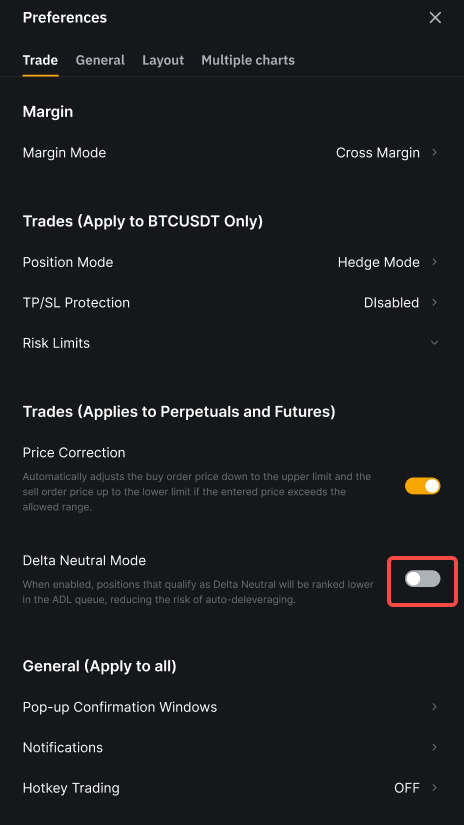
تم تصميم وضع الدلتا المحايد(Delta Neutral Mode) لتعزيز تجربة التداول للمستخدمين الذين يديرون استراتيجيات دلتا محايدة. عند التفعيل، يتم تخفيض ترتيب المراكز التي تفي بمعايير الدلتا المحايدة في قائمة ADL (التدوير التلقائي للرفع)، مما يقلل من خطر التدوير التلقائي للرفع خلال ظروف السوق القاسية.
متطلبات الأهلية
لتفعيل وضع دلتا محايد، يجب أن يكون المستخدمون VIP 3 أو أعلى مع أحدث حساب تداول موحد (UTA).
بمجرد تفعيل الوضع، يجب أن يفي الموقع بجميع الشروط التالية للتأهل كدلتا محايد:
- يتم ضبط الحساب على وضع الهامش المتقاطع (CM) أو الهامش المحفظي (PM).
- يتم الحفاظ على coinDelta عند 0.05 أو أقل.
ملاحظة: يتم تفعيل وضع الدلتا المحايد على مستوى الحساب. تمكينه في الحساب الرئيسي الخاص بك لا ينطبق تلقائيًا على الحسابات الفرعية.
كيف تتغير تصنيفات ADL مع وضع دلتا نيوترال
يتم تخصيص أوضاع المؤهلة كدلتا نيوترال أولوية أقل في قائمة انتظار ADL عن الأوضاع غير المؤهلة. سيتم تطبيق ADL على أوضاع دلتا نيوترال فقط بعد أن يتم تسوية جميع الأوضاع غير المؤهلة.
داخل مجموعة دلتا نيوترال، تظل منطق الترتيب الحالي لـ ADL دون تغيير. للمزيد من التفاصيل، راجع آلية التخلص التلقائي من المخاطرة (ADL).
ترتيب ADL قبل التغيير:
تصنيف تخفيض تلقائي للاعتماد (ADL) بعد التغيير:
في المثال أعلاه:
- المستخدم 5 هو مستخدم VIP 1 ولذلك فهو غير مؤهل لاستخدام وضع دلتا المحايد.
- المستخدم 1، المستخدم 2، المستخدم 4 والمستخدم 6 قد قاموا بتفعيل وضع دلتا المحايد. ومع ذلك، تجاوز المستخدم 2 قيمة coinDelta لـ0.05، والمستخدم 6 يستخدم الهامش المعزول (IM). نتيجة لذلك، فقط المستخدم 1 والمستخدم 4 يستوفيان معايير دلتا المحايد، ويتم تصنيف مراكزهم بشكل أقل في قائمة ADL.
- داخل مجموعة دلتا المحايد، الترتيب الأصلي يظل دون تغيير. لذلك، يستمر المستخدم 4 في التصنيف الأقل من المستخدم 1.
ملاحظة: على الرغم من أن coinDelta تُحسب في الوقت الفعلي، قد يكون هناك تأخير طفيف قبل أن يعكس تصنيف ADL التحديث.
حساب coinDelta
coinDelta تقيس مدى قرب تعرّضك الإجمالي من أن يكون محايدًا للدلتا. تأخذ في الاعتبار جميع الأصول والمراكز المفتوحة المرتبطة بنفس الأصل الأساسي.
الصيغة كالتالي:
- coinDelta = coinAccountSize ÷ coinBaseSize
- coinAccountSize = abs(longSize + shortSize)
- coinBaseSize = max(longSize, abs(shortSize))
حيث:
- يمثل coinAccountSize تعرّضك الصافي بعد موازنة المراكز الطويلة والقصيرة.
- يمثل coinBaseSize مركزك الاتجاهي الأكبر.
يتم حساب coinDelta بشكل مستقل ولا يتأثر بمقاييس المخاطر الأخرى، مثل متطلبات الضمانات أو حدود التصفية.
مثال
افترض أنك تمتلك الأصول والمراكز التالية من BTC:
الحساب كالتالي:
- حجم طويل = 5 + 3 + 3 + 3 = 14
- حجم قصير = -4 − 3 − 2 = -9
- حجم الحساب = abs(longSize + shortSize) = abs(14 - 9) = 5
- حجم الأساس = max(longSize, abs(shortSize)) = max(14, abs(-9)) = 14
- دلتا = accountSize ÷ baseSize = 5 ÷ 14 ≈ 0.357
نظرًا لكون 0.357 يتجاوز حد 0.05، فإن هذه المراكز على BTC لا تعتبر محايدة الدلتا.
كيفية تمكين وضع دلتا المحايد
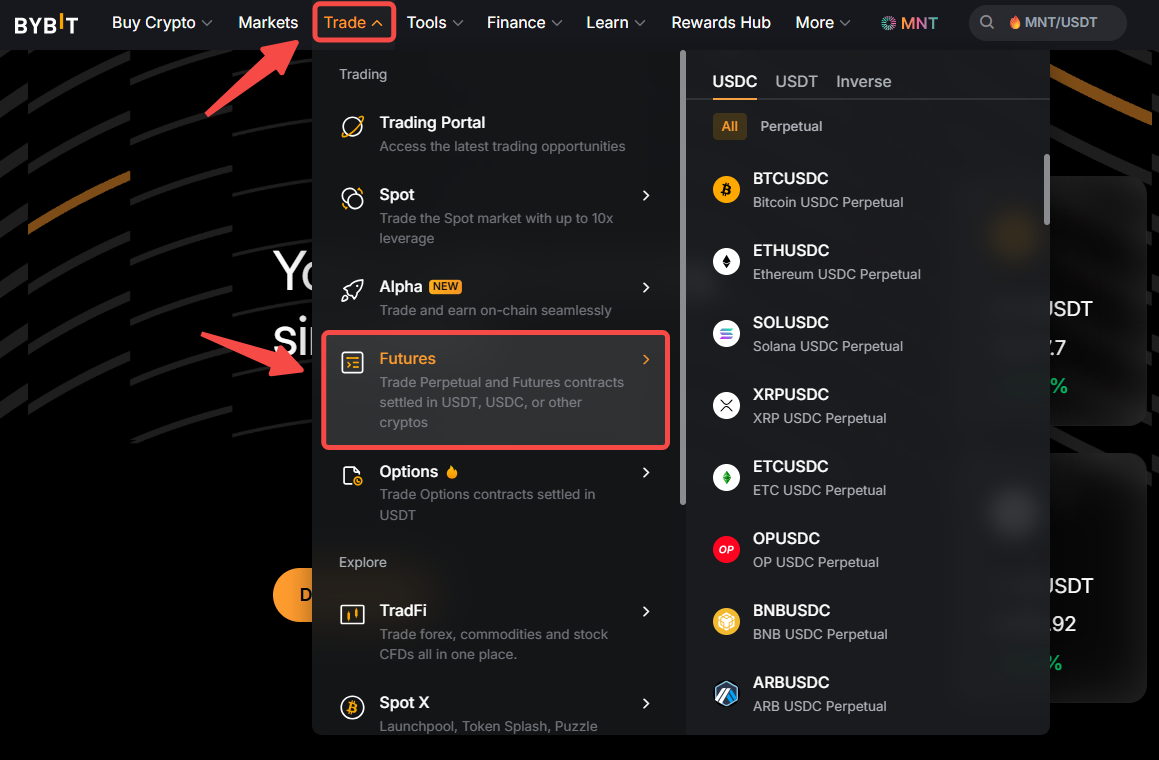
الخطوة 1: سجل الدخول إلى حسابك في Bybit وانقر على التداول → العقود الآجلة في شريط التنقل العلوي.
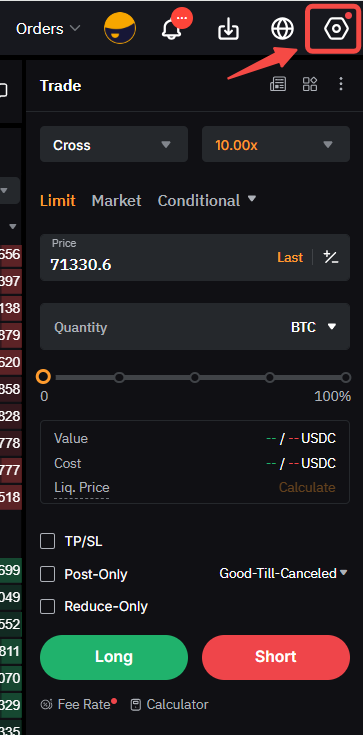
الخطوة 2: اختر أيقونة الإعدادات في الزاوية العلوية اليمنى للوصول إلى التفضيلات.
الخطوة 3: تحت علامة التبويب التداول، شغل زر التبديل وضع دلتا المحايد.