
Bybit AI is your dedicated AI assistant for Bybit services and beyond. It allows you to interact with Bybit using natural language — ask questions, retrieve market news and data, manage your assets, and execute trades, all through simple conversational commands.
Bybit AI is designed for global users and covers most query and execution scenarios.
How It Works
Bybit AI is accessible directly from the Bybit platform.
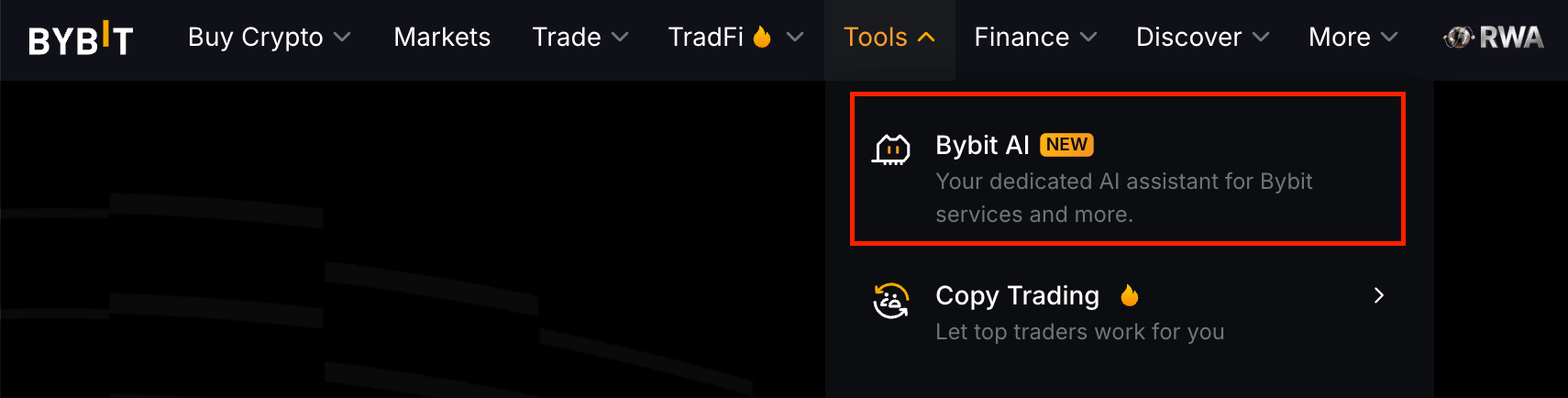
On the Bybit website, hover your cursor over Tools and click Bybit AI from the dropdown menu.
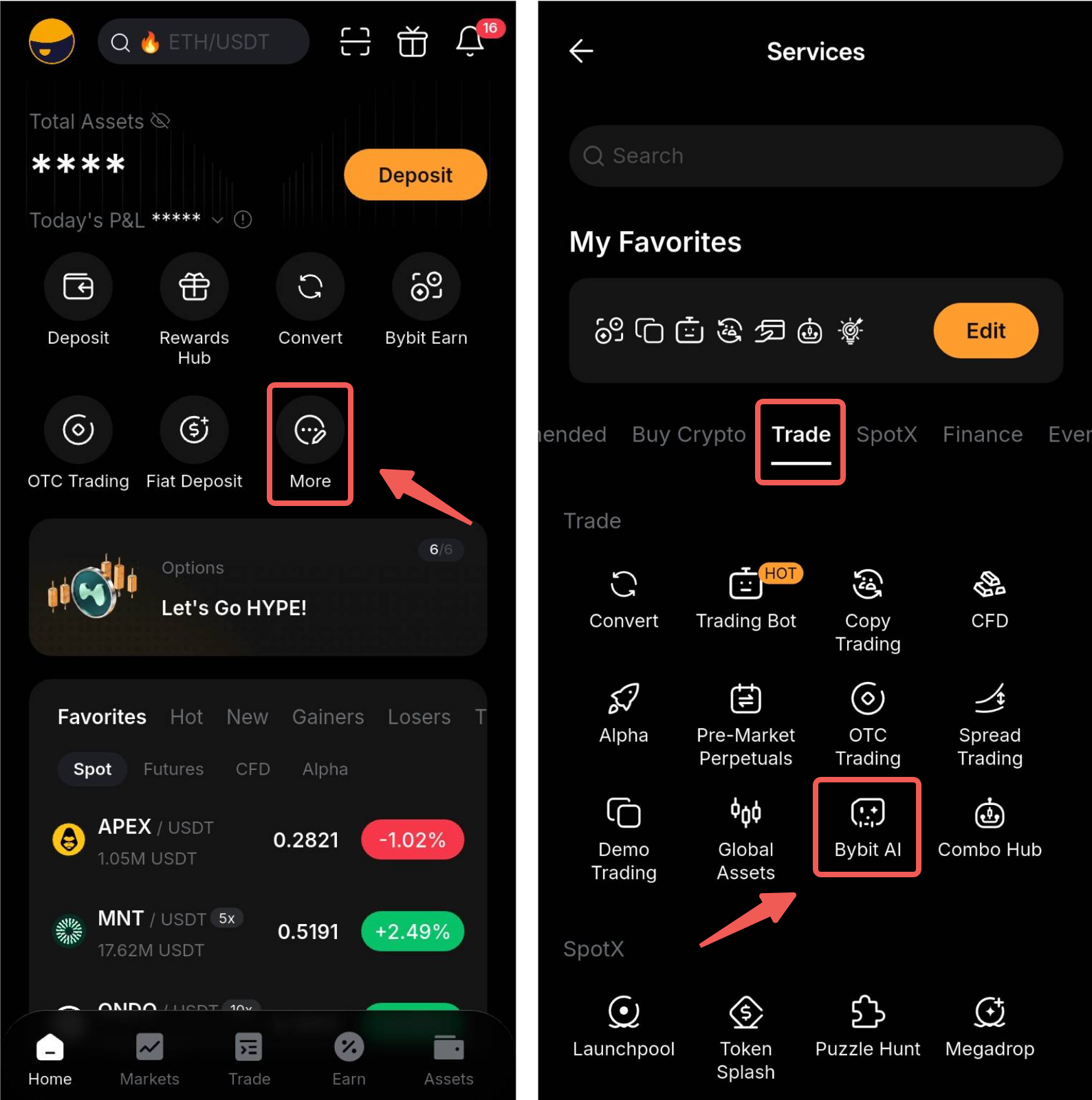
On the Bybit App, you can go to More and select Bybit AI under Trade.
Once you are on the Bybit AI page, here's how to get started:
- Access Bybit AI — Open Bybit AI from the Web or App.
- Trade Execution — Bybit AI now executes trades through your Main Account by default. You can instruct Bybit AI to switch to the Bybit AI Subaccount instead, and ask it to remember your preference.
- Create a Bybit AI Subaccount — A dedicated subaccount is still available as a sandboxed environment for AI-driven trading.
- Start Using Bybit AI — Issue natural language commands to query information, execute trades, or manage your account.
What Can Bybit AI Do?
Bybit AI supports both information and transactional requests, with different handling depending on the type of request.
Information and Customer Support
Through your Main Account, Bybit AI can:
- Retrieve market data, account information, and product details
- Check the status of customer support tickets
- Connect you with Customer Support
Transactions Requiring Confirmation
For actions involving orders or assets, Bybit AI will first identify the opportunity or prepare the transaction details for your review. Supported actions include:
- Fund transfers
- Convert
- UTA trading
- P2P orders
- Trading Bot and Copy Trading
- Earn subscriptions
You must review and confirm the details before any transaction is submitted. Once confirmed, the transaction will be processed through your Main Account (default) or your Bybit AI Subaccount, depending on your preference. Bybit AI will not execute or submit transactions without your confirmation.
Disclaimer: Any market information, analysis, or potential trading opportunities presented by Bybit AI are for informational purposes only and do not constitute investment advice or an investment recommendation. Bybit AI does not provide investment, legal, or tax advice. You should seek advice from an independent qualified professional where appropriate.
Key Features
Natural Language Interaction
Simply type what you want to do in plain language. No need to navigate complex menus or memorize trading parameters.
Example commands you can try:
- "Show me BTC price and 24h trend"
- "What's my USDT balance?"
- "Buy 0.01 BTC at market price"
- "What's the funding rate for ETHUSDT?"
- "Transfer 100 USDT to my Bybit AI Subaccount"
Chat History
Bybit AI saves up to 60 recent conversations within a 7-day window, so you can review past interactions and pick up where you left off.
Quick Shortcuts
Bybit AI provides quick shortcuts for common actions such as checking assets, initiating transfers, and viewing orders so you can act fast without typing full commands.
Bybit AI Subaccount: Security by Design
The Bybit AI Subaccount key security features include:
- Isolated Funds — AI can only access funds you transfer into the AI Subaccount
- Asset Cap — A maximum total value the Bybit AI Subaccount can hold
- Daily Transfer Limits — Controls on how much can be moved in or out per day
- Trading Permissions — Granular control over highest leverage
- Same Account Switch Experience — Switch to the Bybit AI Subaccount just like any standard subaccount
Notes:
— Bybit AI can only be used from your Main Account. If you are viewing the Bybit AI Subaccount, switch back to your Main Account to access Bybit AI.
— Bybit AI Subaccount does not support a separate login and can only be accessed by switching from your Main Account
— Bybit AI now executes trades through the Main Account by default. The Bybit AI Subaccount remains available for users who prefer isolated trading. You can instruct Bybit AI to switch accounts and remember your preference.
Staying in Control: Built-In Safeguards
With Bybit AI, you will always have the final say. Every financial action requires your approval before it goes through. Here’s how it looks in practice:
a. You decide what gets executed. Bybit AI always seeks explicit confirmation before executing any financial transaction. It presents a proposed action with full details (e.g., order amounts, leverage, TP/SL settings). This means no funds are moved without your approval, and decision-making stays in your hands.
b. Trading activity stays isolated. Bybit AI operates through its own dedicated subaccount, which is separate from your main account and governed by its own permission settings. This subaccount is distinct from the General AI subaccount, which you can connect to third-party AI tools like Claude Code and OpenClaw. Please note that services available only through the Main Account, such as P2P Trading, are not covered by this isolation.
c. Customer support escalation. For complex customer support cases, Bybit AI will automatically escalate the case to a human agent.