General Inquiries
Is USDx a cryptocurrency?
No, USDx is not a cryptocurrency. It is an internal balance unit used on the platform to show your funds in U.S. Dollar terms. The conversion between USDT and USDx will remain 1:1.
Why did my USDT become USDx? Did I lose anything?
Not at all. When you convert or deposit USDT, it may be shown as USDx in your account. This is purely for easier tracking. Your balance remains fully backed and you can convert it back to USDT at any time at a 1:1 rate.
Can I withdraw USDx?
No. USDx is not an on-chain asset. To withdraw, you can convert your USDx back to USDT instantly at a 1:1 rate, then proceed to withdraw USDT as usual.
Why use USDx at all?
USDx helps us show your balances in a clear and consistent way, and also helps us meet accounting and regulatory standards. It is a display and accounting tool only. Your funds remain yours and fully backed.
Is KYC required to trade on TradFi?
Yes, Standard Individual KYC or Business KYC is required. For more information on how to verify your account, please refer to How to Complete Individual KYC Verification and Business KYC.
If a user’s account is not verified, the following pop-up will appear when attempting to activate the TradFi account.

What are the minimum system specifications for using MT5?
To ensure optimal performance while running MetaTrader 5, your system should meet the following requirements:
- Windows: Windows 7 or later
- CPU: 2.0 GHz or faster
- RAM: At least 512 MB (1 GB recommended)
- Screen Resolution: 1024 x 768 or higher
- Internet Connection Speed: 56 kbps or faster
- iOS iPhone: iOS 9.0 or later
- Mac: macOS 11.00 or later and a Mac with the Apple M1 Chip
- Android: Android 5.0 and above
Are subaccounts supported on TradFi?
No, subaccounts are not supported on MT5. Only a Bybit main account can activate a TradFi Account.
How can I check my TradFi Login ID?
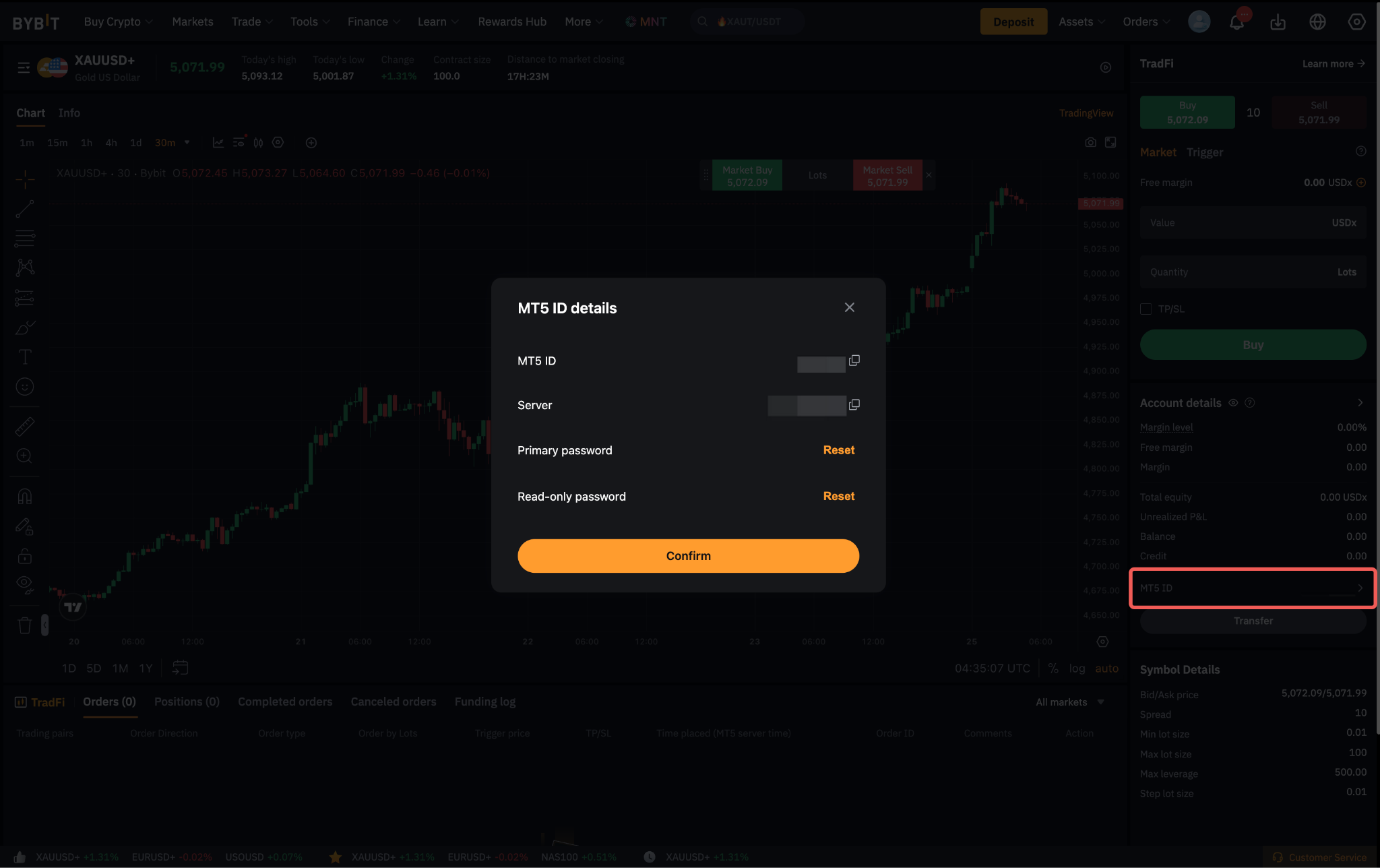
For seamless access and more convenient trading experience, TradFi has already been integrated into your Bybit account. However, you may still trade via the MetaTrader Client Terminal by using your MT5 Account ID. After the successful activation of your TradFi account, you can check your login ID details by clicking on the MT5 ID section under the Account Details.

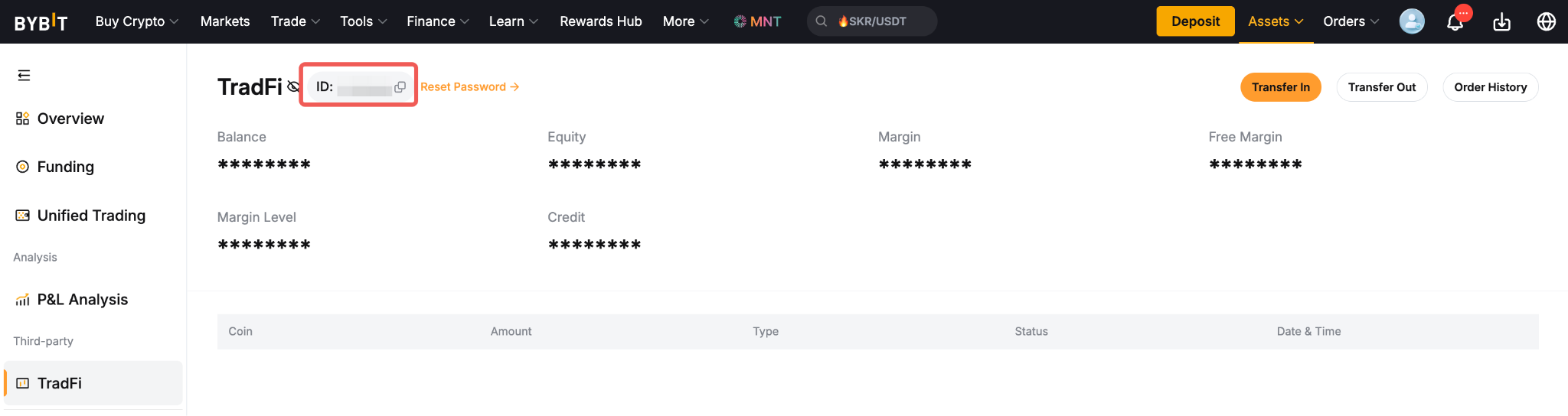
Alternatively, you may click on the TradFi Asset page and the login ID will be displayed at the top of the page.

How do I amend the language display for MT5?
To change the language display on your MT5 Client Terminal, simply click on the View menu → Language, and select the language of your choice in the list available.

Once done, a dialog box will appear prompting you to restart the terminal. Click Restart and the new languages will be applied once the MT5 Client Terminal is reopened.

What is the timezone applied on MT5 and how can I change it?
The time zone displayed on Bybit’s MT5 is by default UTC+2 and cannot be changed. However, this time zone will be changed to UTC+3 when Daylight saving starts on the Second Sunday in March at 02:00 AM UTC and will go back UTC+2 at the end of Daylight saving on the First Sunday in November at 02:00 AM UTC.
Trading on TradFi
Are there any margin requirements when trading on TradFi?
TradFi utilizes a tiered margin for the margin requirements for all contracts available on MT5. This means that the higher the position value being traded, the higher the margin requirement at a tiered level. Users may refer to the Tier Margin Table here for a better understanding.
How are CFD products settled on TradFi?
All CFD products are settled in USD, whereas the deposit currency is USDx. The exchange between USDx and USD will happen automatically during your trading CFDs.
What is the leverage on TradFi?
Different contracts within TradFi will have different default leverage. For the details of each contract and their default leverage, please refer to the TradFi Contract Specification here.
Can I change my leverage setting on TradFi?
No, the leverage settings on TradFi cannot be changed manually. Different contracts have different default leverage, and users are not able to modify them.
What is the maximum number of orders and positions I can have on TradFi?
Currently, users are able to have a combination of up to 200 active orders and 3,000 positions.
Why are each of my orders visible in different rows in my Positions tab?
Unlike on the Bybit mainnet trading, a trading position on TradFi will not be combined. Rather, when you place a new order in TradFi, it creates a new position and is displayed as a new row in the Positions tab of your Trade window.
Can I trade in Hedge Mode?
TradFi allows users to trade within the hedging mode. With the ability to hedge, users can open multiple positions in the same trading instrument, both long (buy) and short (sell), independently. As each new position will appear as a separate row in the Positions tab, you can establish more sophisticated trading strategies, such as opening a long position to profit from a potential upward move while simultaneously holding a short position to hedge against potential losses.
Can I adjust the negative balance on my TradFi account?
No, negative balance adjustments cannot be made by the user. Please contact our live chat service for a review of your case.
MT5 Servers
What are the servers used for Bybit MT5?
Please find below the details for each server used for Bybit MT5:
- MT5 Live Server
- Name: Bybit-Live
- IP: 52.76.17.190:443
- Name: Bybit-Live2
- IP: 18.140.32.42:443
- Name: Bybit-Live3
- IP: 8.221.141.101:443
- Name: Bybit-Live4
- IP: 8.221.136.95:443
- Name: Bybit-Live5
- IP: 8.221.139.221:443
- Name: Bybit-Live6
- IP: 8.216.83.28:443
- Name: Bybit-Live7
- IP: 47.245.60.34:443
- MT5 Demo Server
- Name: Bybit-Demo
- IP: 147.160.254.81:443
Can Bybit offer Virtual Private Servers (VPS) Services?
No, Bybit does not provide any VPS services. However, users who wish to use VPS services may find more information on the MetaTrader website here.
For better latency, users may want to consider selecting a VPS data center based in Japan as the Bybit Live MT5 servers are also located there.