
Bybit Card enables easy and secure access to your fiat and digital funds for spending on the go. We offer a virtual Bybit Card for you to make online payments as well as a physical Bybit Card for you to use in-store. This article will guide you on how to apply and activate a Bybit Card.
How to Apply for a Bybit Card
For a Virtual Bybit Card
For a Physical Bybit Card
How to Cancel Your Bybit Card Application
How to Activate Your Bybit Card
For a Virtual Bybit Card
For a Physical Bybit Card
How to Apply for a Bybit Card
For a Virtual Bybit Card
Step 1: Launch the Bybit App, and log in to your account. Tap on More located on the home page, then tap on Card. Alternatively, you can use the Search bar and search for Card.
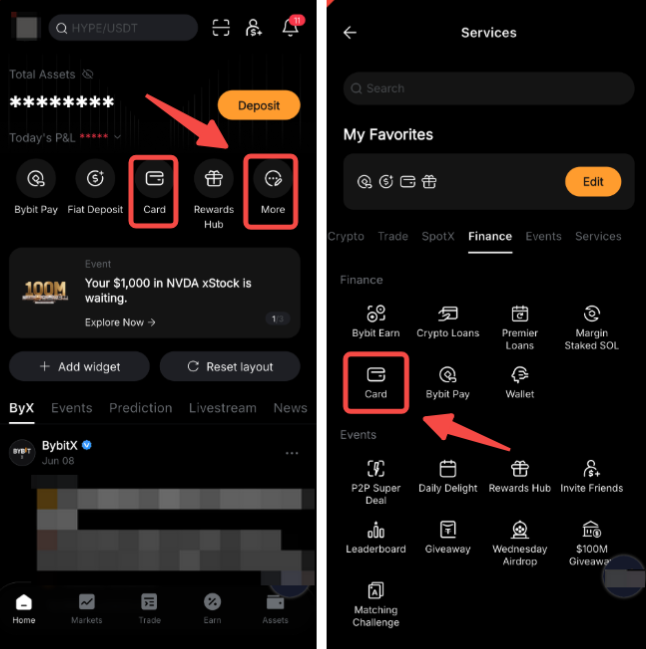
Step 2: Tap on Apply Now, select your country of residence and click on Register.
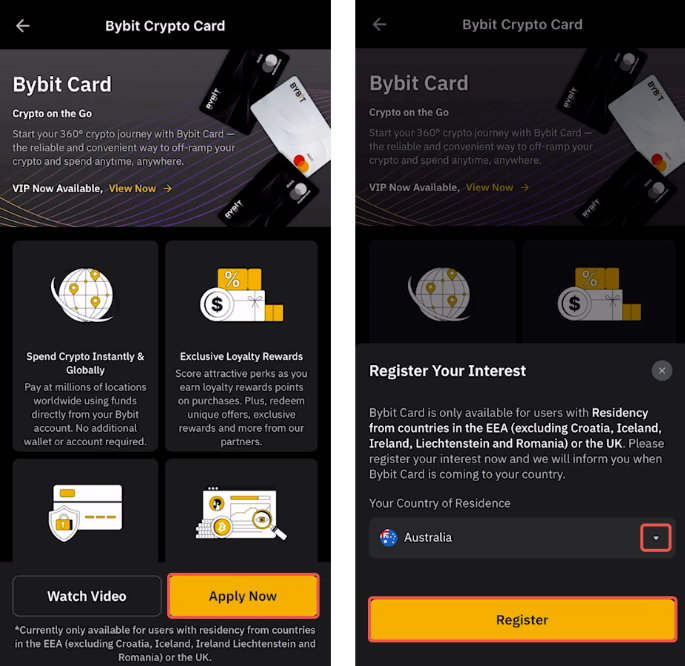
Note: Bybit Card is currently only available in limited countries. If your selected country of residence is not within the supported countries, we will register your interest now and inform you when Bybit Card is coming to your country.
Step 3:
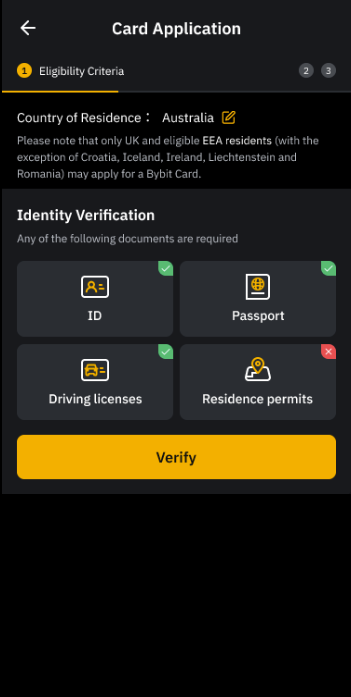
a) Complete the requirement of Eligibility Check: Identity Verification by submitting your proof of identity and click Verify.
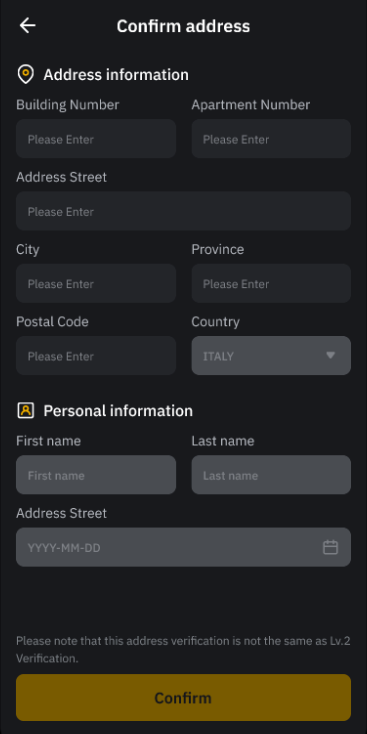
b) Provide your residential address. Rest assured that this address will not be used for delivery purposes and billing address.
Notes:
- Bybit Card has more stringent requirements for Identity Verification. Hence, you may be required to update your Identity Verification even though you have already completed it on your Bybit account previously.
- If your identification document does not meet the requirements, please Verify Again with other supported documents, or if you prefer not to proceed, tap Cancel Application.
- If you have already completed Advanced Identity Verification before or during card application, but your country of residence is not eligible, you may re-verify by tapping Submit New Address.
- For more information on the supported proof of identity and address of residence, please consult this page.
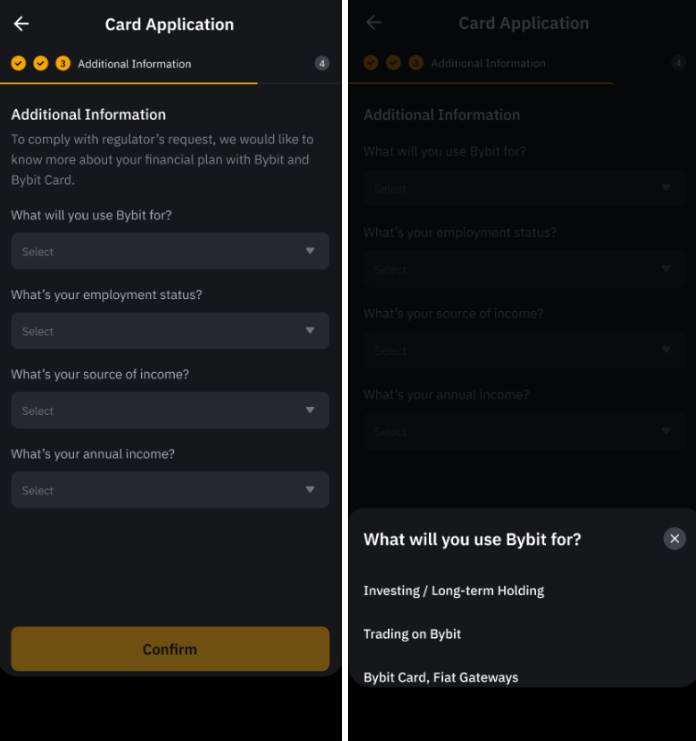
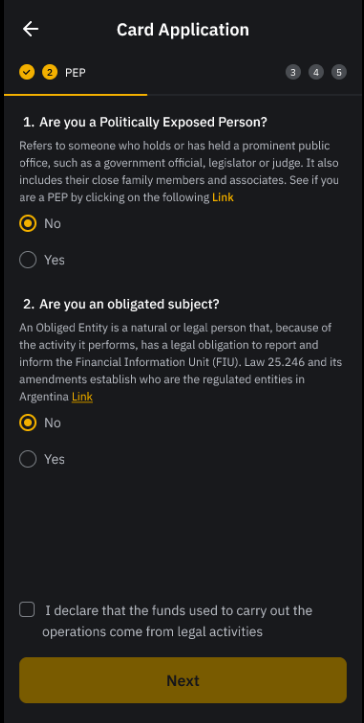
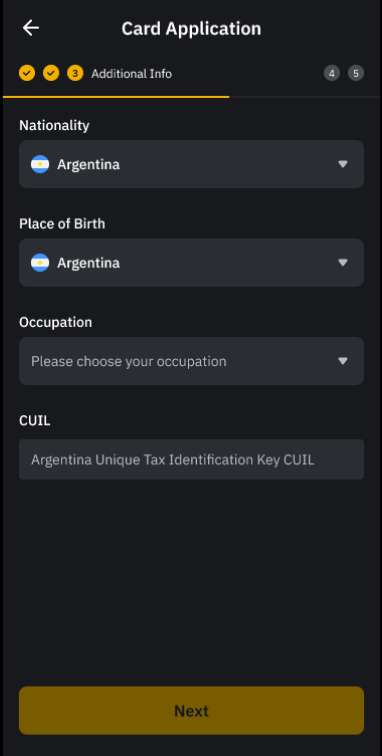
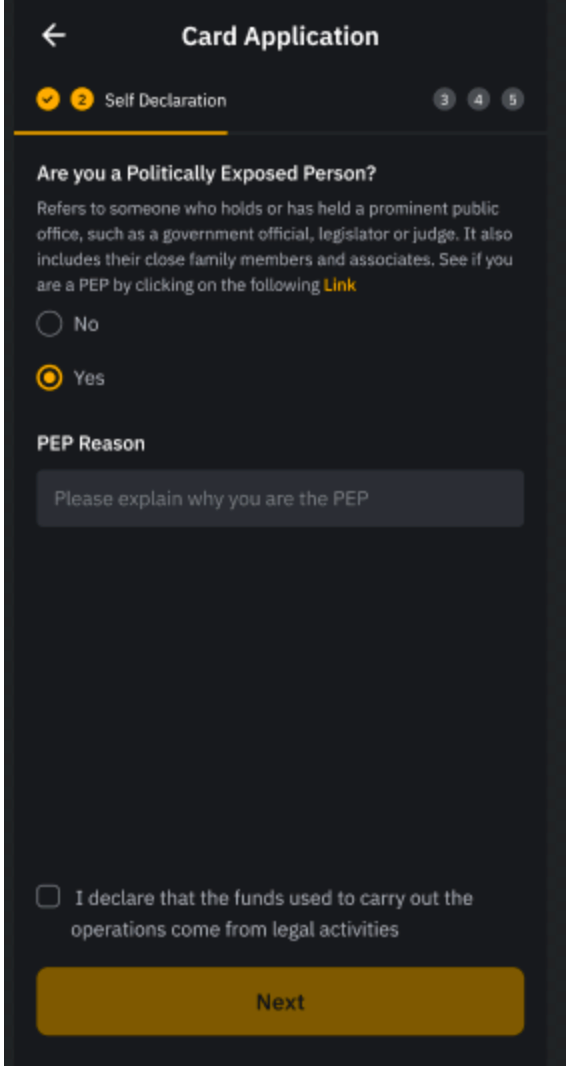
Step 4: Some Cards will require additional information. Finalize your Bybit Card application by providing the requested details and click on Submit once done.
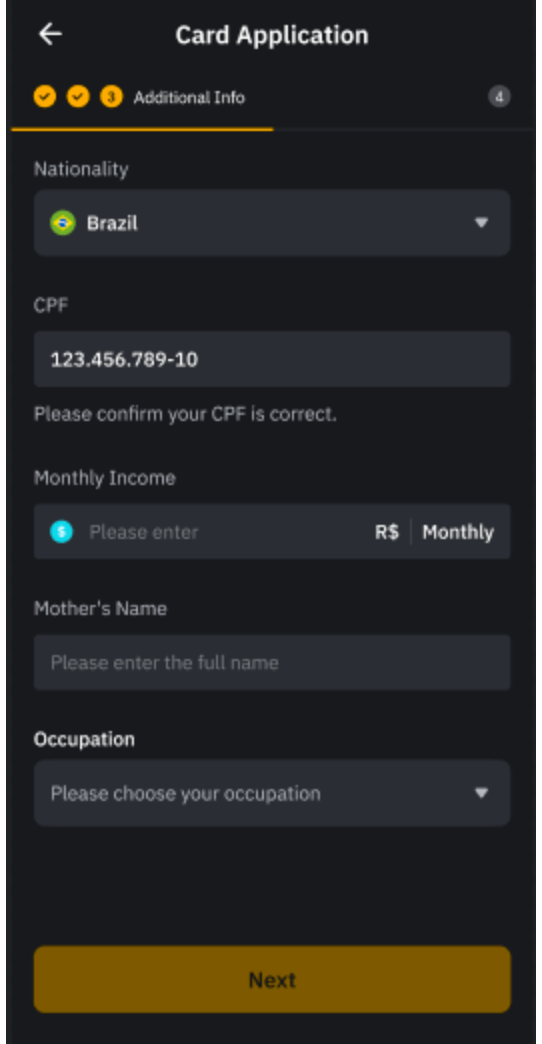
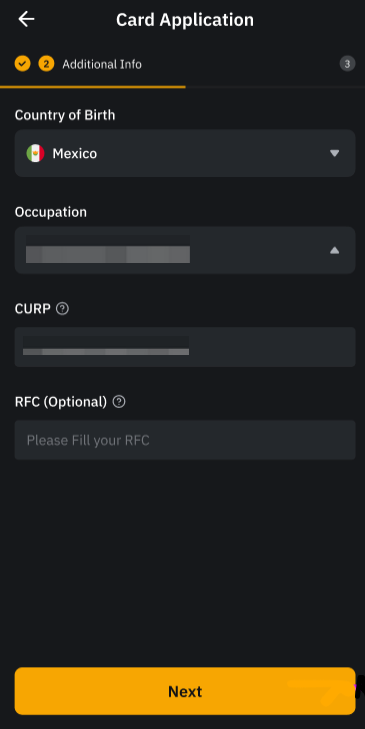
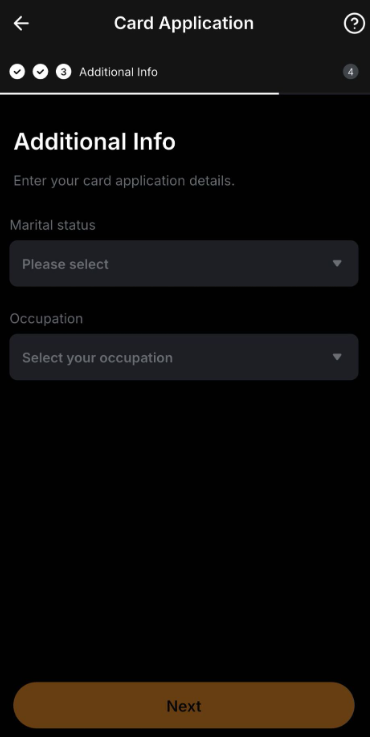
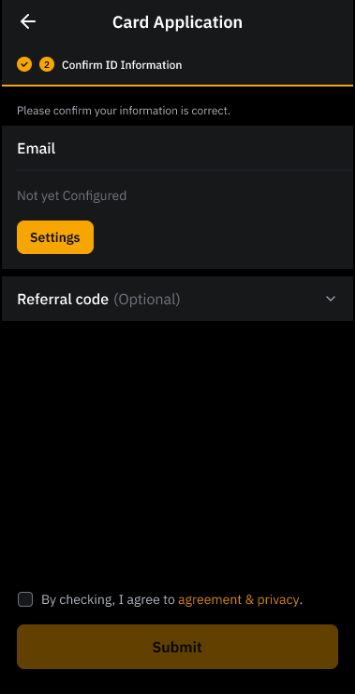
Step 5: Confirm (or set up) your registered email address and/or your mobile number. You will also be requested to set up Google 2FA if you have not set it up yet.
Read and agree to the Bybit Terms and Conditions and tap Submit.
Notes:
- You may be prompted to verify your mobile number. Simply tap Request Verification Code and enter the code accordingly.
- If your mobile number is not eligible, you may enter a supported number and tap Submit, or tap Close Application.
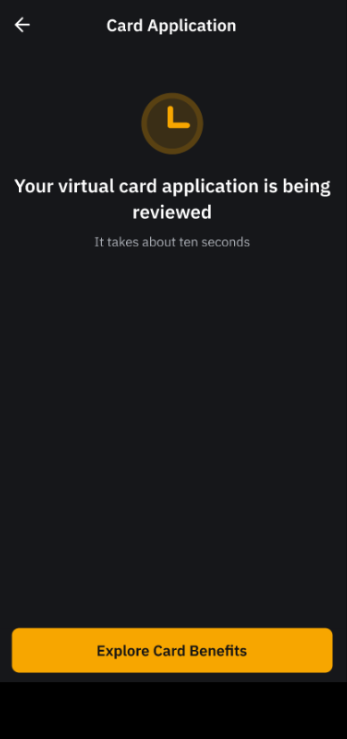
After successful submission, your virtual Bybit Card application will be under review and this process usually takes a few minutes. In some cases, the review can take up to 7 working days. You will be notified via email when your application is successful.
For a Physical Bybit Card
To apply for a physical card, you must first successfully obtain a virtual card. Please note that the Physical Card will be rolled out to users in phases and it is not yet available in Peru. If you are not eligible now, please join the waitlist.
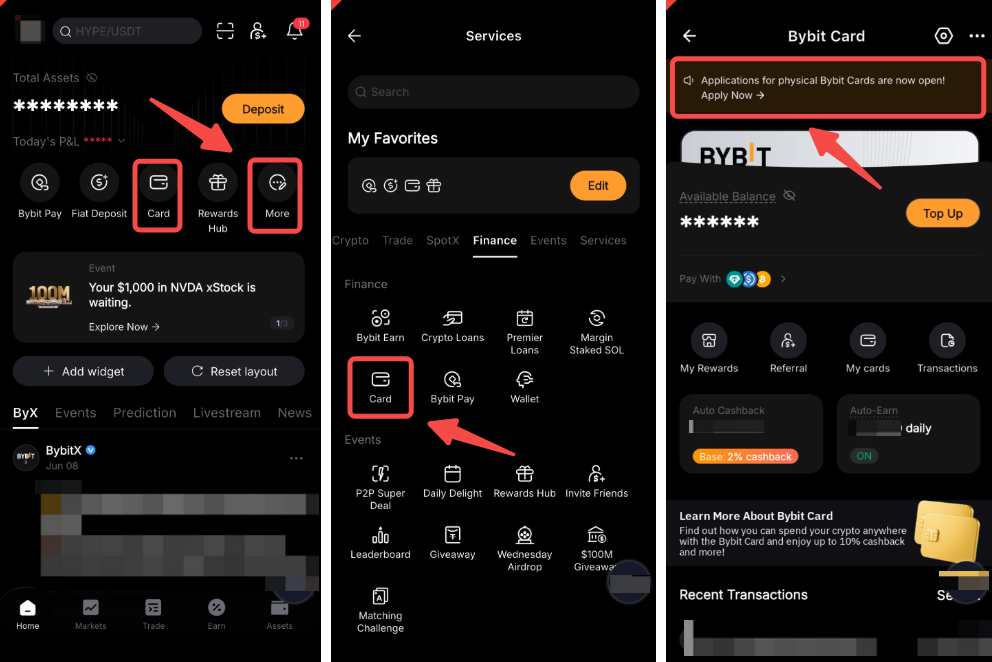
Step 1: Launch the Bybit App, and log in to your account. Tap on More located on the home page, then tap on Card. Tap Apply Now on the physical Bybit Card Application banner.
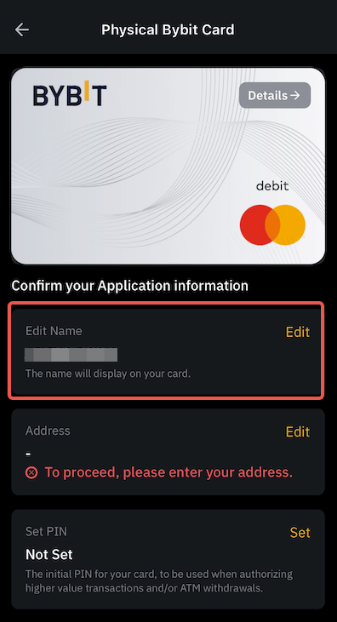
Step 2: Edit the display name on your card. Please note that the display name can only contain up to 21 Latin characters and spaces.
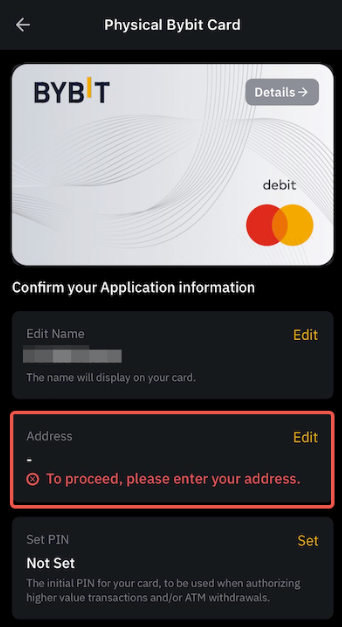
Step 3: Edit your shipping address. Please note that the shipping address should be the same as the address submitted for your virtual Bybit Card's Address Verification. Once done, click on Apply to submit your application.
Notes:
— An address change request will be reviewed within 7 business days and you will be informed of the outcome via email. Please ensure that the addresses notification@bybit.com and complianceops@bybit.com are added to your address book to ensure our email enters your inbox.
— Bybit reserves the right to reject any address change request if the edited address is inconsistent with your virtual Bybit Card's Address Verification. We currently do not support submitting additional proof of address to change the shipping address.
— For Bybit Card AIFC, users can choose their delivery preference. Selecting DHL Expedite offers faster, priority shipping. Please note that a Tax ID is required for DHL delivery services to certain countries to comply with customs regulations and ensure smooth processing of international shipments.
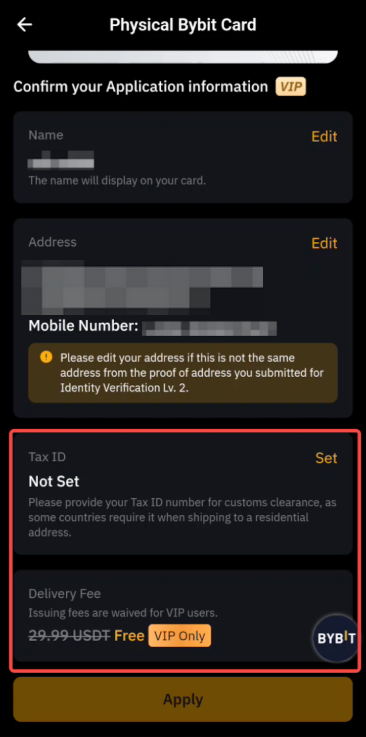
— For more information on Bybit Card Shipping and the change of shipping address, please consult this FAQ.
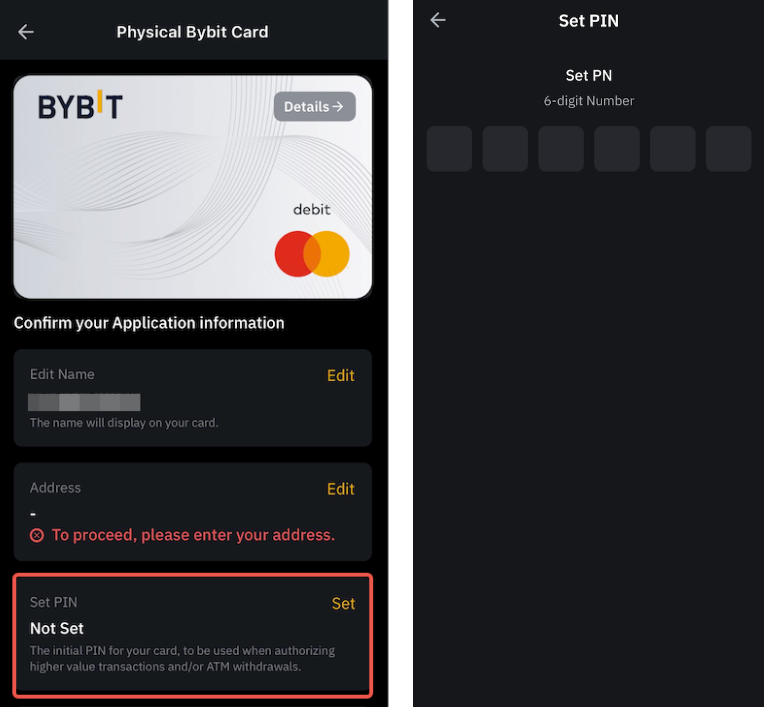
Step 4: For Bybit Card Australia and Asia Pacific, you will also need to set and verify your PIN. The PIN will be used for ATM transactions and to make large purchases at retail merchants. You can still reset the PIN after activating the card. However, please keep your PIN securely and privately. Click on Apply after you have confirmed the details.
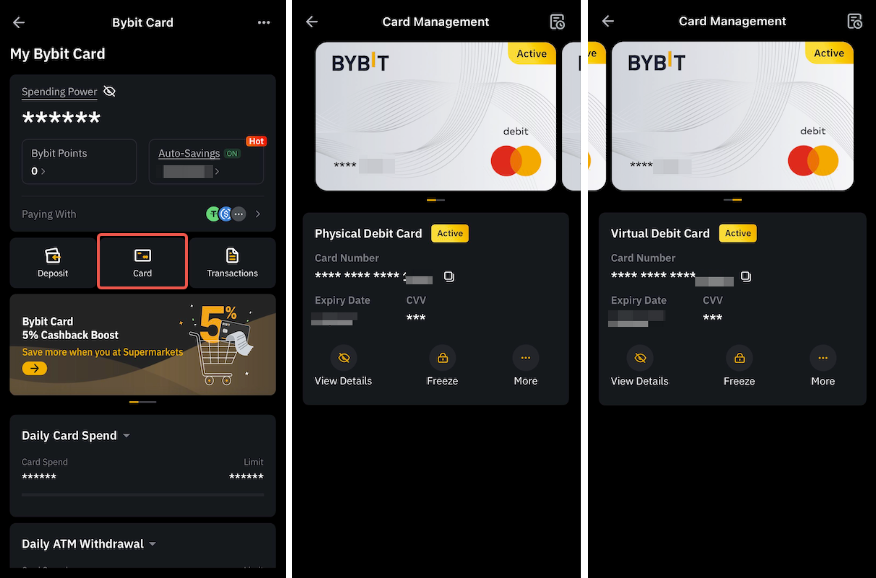
After successful submission, you may check the delivery status by tapping the View Status button to be redirected to the Card Management page.
The card delivery might take up to 30 days to arrive, depending on the logistic vendor and your country of residence. Please refer to this FAQ for more information on the shipping services and the card delivery status descriptions.
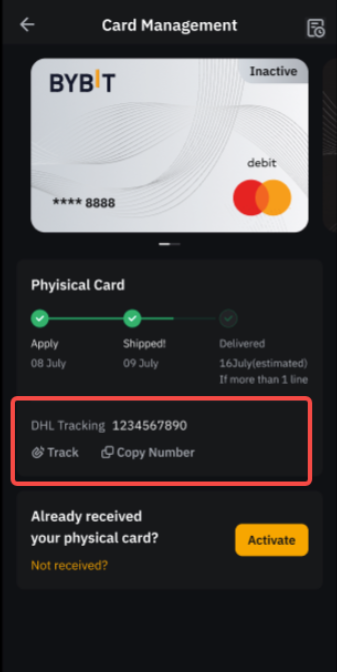
Note: We are not able to provide the shipment status details as most delivery methods used do not offer a tracking service. However, for VIP users on DHL Delivery, the tracking number will be shown on the Card Management page once the card has been shipped.
How to Cancel Your Bybit Card Application
Please refer to the following instructions based on the status of your application:
a) If you haven’t submitted your application yet:
If you are still in the process of applying for the card and haven't submitted it yet, you can tap on the three dots icon and select Discard My Application.

b) If your application is pending for review:
You can click on View my application and then on the '?' button. Then, choose Discard My Card Application.
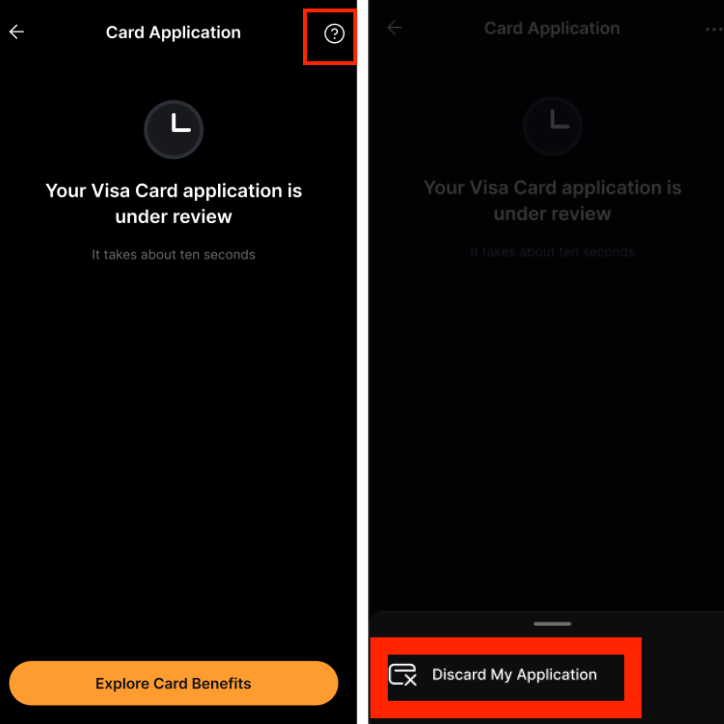
Notes:
- Only Bybit card applications with a Pending status can be cancelled.
- If your card application got rejected after submission, you can always Start Over with a new application.
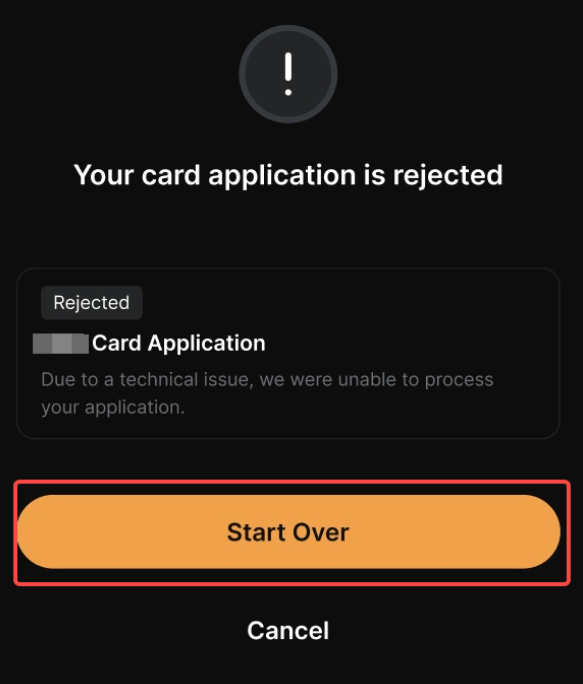
c) If your application is approved:
To cancel your application after submission, please go to the Card Management page to terminate it. For guidance, you may refer to this article.
How to Activate Your Bybit Card
For a Virtual Bybit Card
Before unlocking immediate access to online and overseas transactions, please go to your Settings page and complete your personal information which may include your Billing Address and/or Mobile Number. You will also be prompted to fill up this information when clicking on Card Details on the Card Management page if you haven’t done so.
Once you have completed the verification process, your Virtual Bybit Card will be automatically activated upon successful application.
Notes:
— Bybit Card AIFC does not require any additional verification. You can use your Virtual Bybit Card as soon as your application is approved.
— Your Bybit Card personal information (Billing Address, Mobile Number…) will be utilized for Bybit Card transactions and will operate independently from your Bybit account.
— Overseas payments do not require additional activation of your Bybit Card. However, a foreign exchange fee will be charged. For more information, please refer to Fees and Spending Limits (Bybit Card).
For a Physical Bybit Card
Once you receive your physical card, please activate your card before starting to use it.
Step 1: Launch the Bybit App, and log in to your account. Tap on More located on the home page, then tap on Card.
Step 2: Tap on Physical Card and tap on Activate to begin the activation process.
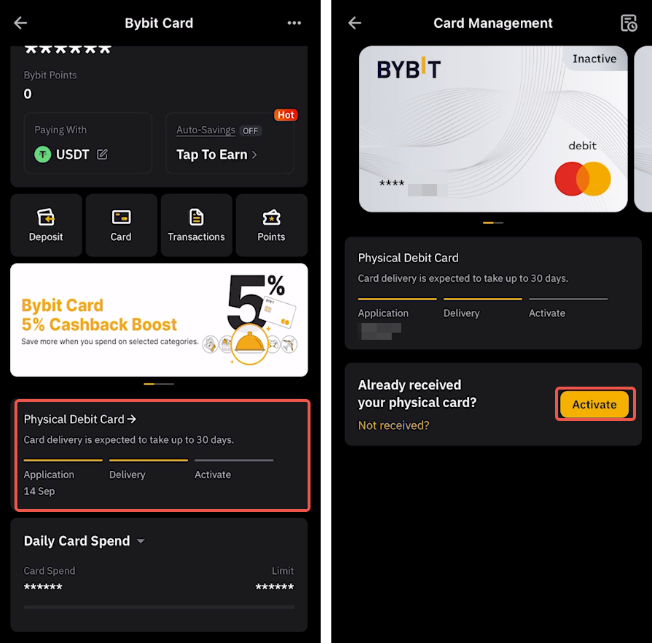
Step 3: For Bybit Card Argentina, Brazil, and Mexico, you will need to select your mobile area code and enter your mobile number. Do note that the number added in the Bybit Card can be changed and will be utilized for Bybit Card transactions. It operates independently from your Bybit account. Once you have confirmed your mobile number, tap on Next to proceed.
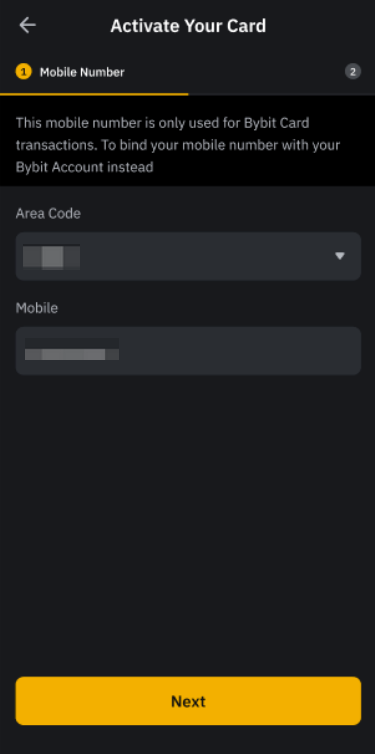
Note: If you have already previously provided your mobile number for the virtual card, you do not need to go through this step.
Step 4: Set and verify your PIN. The PIN will be used for ATM transactions and to make large purchases at retail merchants. You can still reset the PIN after activating the card. However, please keep your PIN securely and privately.
Step 5: Enter the 3-digit CVV on the back of your physical Bybit Card and tap on Activate.
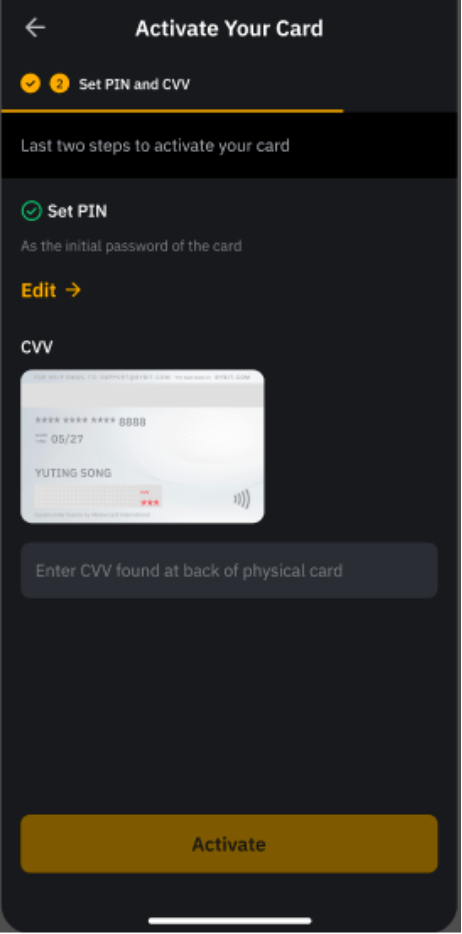
Note: For Bybit Card Australia and Asia Pacific, you will need to input your Mobile Number and Billing Address before entering the CVV if you haven’t provided it yet.
Step 6: For Bybit Card Australia and Asia Pacific, you will need to complete the security verification to finalize the activation:
- Email Verification: Click on Get Code. An email containing the email verification code will be sent to your Bybit registered email address. Please enter the 6-digit email verification code.
- Google 2FA Verification: Please enter the 4-digit Google 2FA code you’ve obtained from your Google Authenticator.
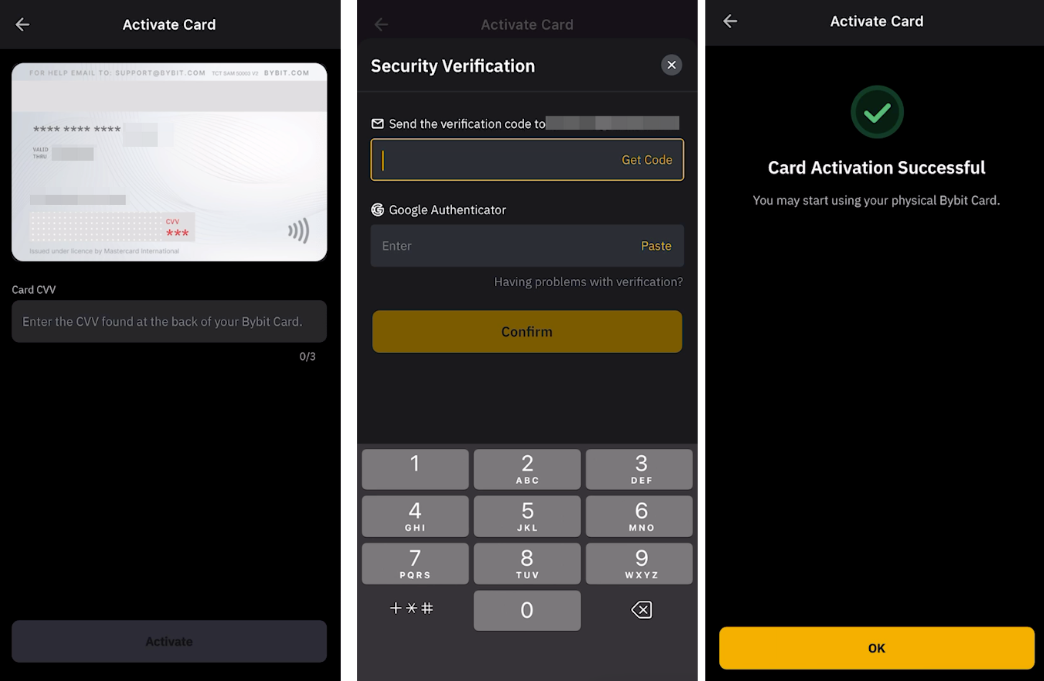
You can now use your physical Bybit Card! You can manage both your virtual and physical Bybit Card on the Card Management page.