
CLMM LP — это функция на платформе Bybit Alpha, которая позволяет поставщикам ликвидности (LP) участвовать в пулах концентрированной ликвидности маркет-мейкеров (CLMM) и распределять капитал в пределах определенных ценовых диапазонов. Такой подход повышает эффективность использования средств и потенциальный заработок по сравнению с традиционным предоставлением ликвидности. Пулы ликвидности формируются на основе данных таких авторитетных платформ, как Byreal, Raydium и Orca, и приносят более высокий доход за счет торговых комиссий внутри пулов.
Ключевые особенности и удобство работы
- Вывод средств и награды: когда пользователи выводят свои инвестиции, они получают основную сумму капитала и все заработанные награды, включая торговые комиссии и токены поощрения.
- Поддерживаемые валюты: Bybit Alpha поддерживает широкий спектр популярных криптовалют, таких как SOL, bbSOL, USDT и USDC, обеспечивая гибкость и доступность для всех пользователей.
- Требования к наличию аккаунта: в целях безопасности и удобной интеграции Bybit Alpha можно использовать только с Единым торговым аккаунтом (ЕТА).
- Комиссии: при инвестировании и выводе средств взимаются сервисные и сетевые комиссии. Они взимаются в той же валюте, что и первоначальные инвестиции, то есть конвертировать токены не нужно.
Ниже представлено пошаговое руководство по участию в CLMM LP и управлению ордерами.
Как принять участие в CLMM LP
Как добавить инвестиции в существующую позицию
Как вывести ликвидность и получить награды
В приложении
Как принять участие в CLMM LP
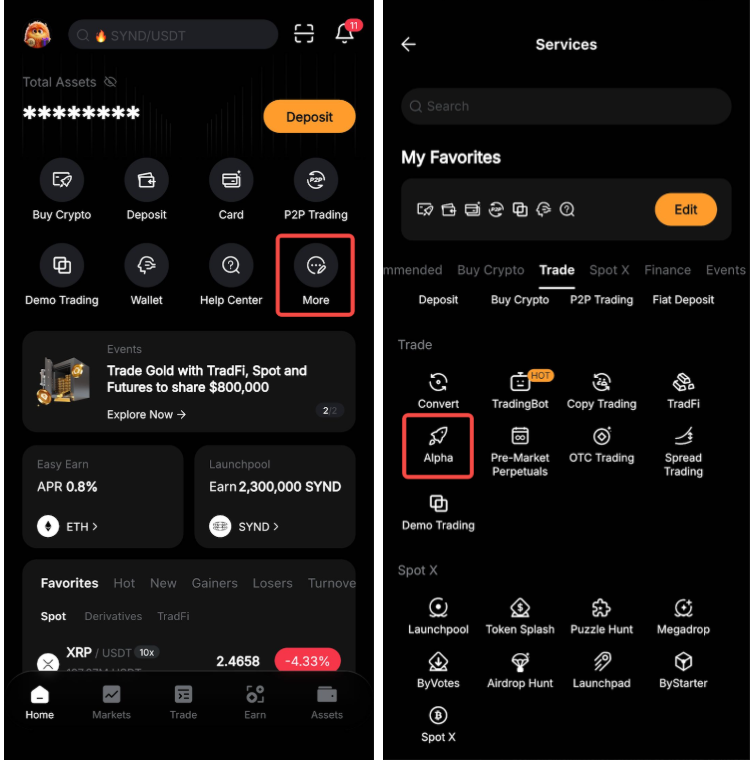
Шаг 1. Откройте приложение Bybit и перейдите в Bybit Alpha одним из следующих способов:
a. Нажмите Торговать на нижней панели. Затем нажмите на значок меню в верхнем левом углу и выберите Alpha.

b. Нажмите Еще на главной странице и выберите Alpha на вкладке Торговать.
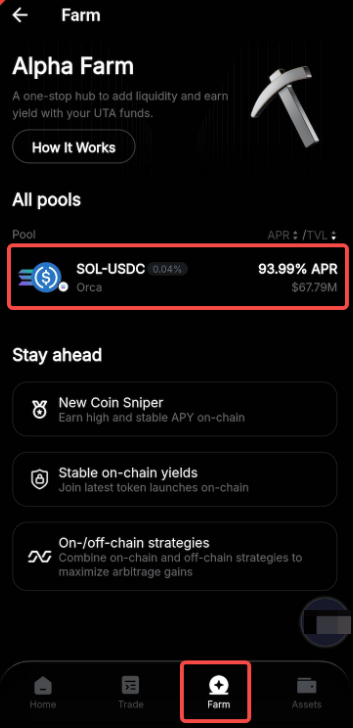
Шаг 2. Перейдите на вкладку с фермой, просмотрите доступные пулы ликвидности в разделе Все пулы и выберите тот, который соответствует вашим инвестиционным целям и допустимому риску.
Шаг 3. Выберите ценовой диапазон, в котором будет использоваться ваша ликвидность. CLMM LP предлагает три варианта:
- Стабильный: более консервативный диапазон, предназначенный для пользователей, предпочитающих более низкую волатильность.
- Стандартный: умеренный диапазон, который сочетает потенциальную доходность с контролируемым уровнем риска.
- Настроить: полностью настраиваемый диапазон для опытных пользователей, которые хотят иметь более точный контроль над своими позициями ликвидности.
После выбора желаемого диапазона нажмите Далее.
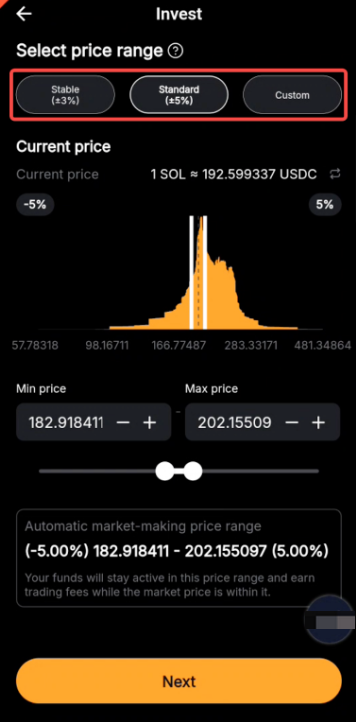
Примечание. Доступные ценовые диапазоны могут отличаться в разных пулах.
Шаг 4. Укажите сумму криптовалюты, которую хотите инвестировать в выбранный пул ликвидности, и нажмите Инвестировать.
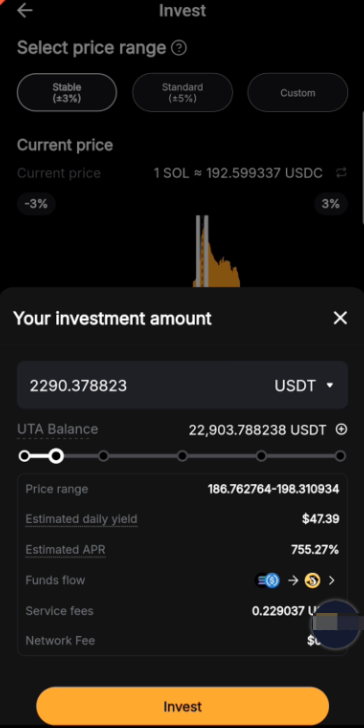
Шаг 5. Во всплывающем окне подтверждения проверьте детали и подтвердите ордер. После этого ваши средства начнут пополнять пул ликвидности.

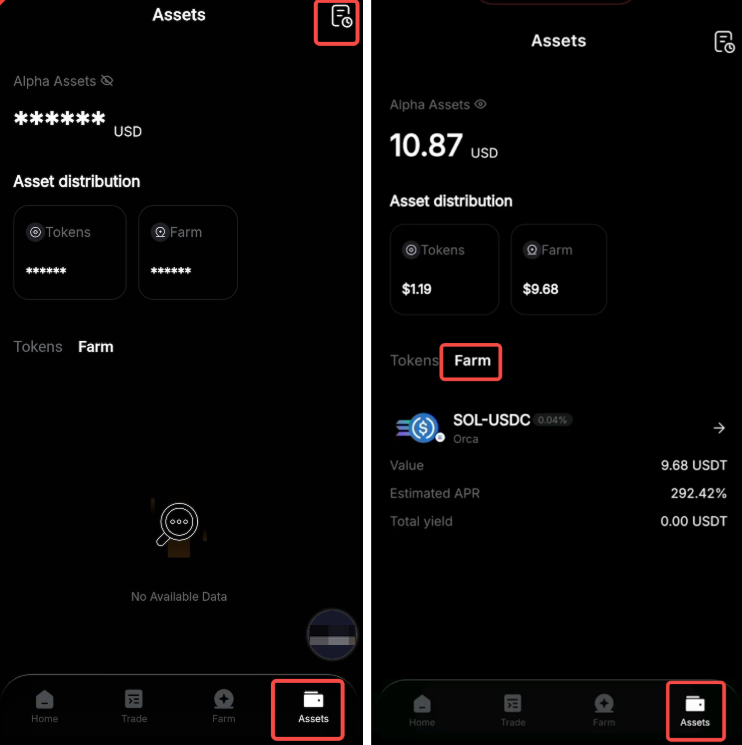
Историю ордеров можно проверить, нажав Посмотреть историю или перейдя в раздел Активы на нижней панели и нажав на значок истории в правом верхнем углу. Для отслеживания активных ордеров перейдите на вкладку Активы → Ферма.
Как добавить инвестиции в существующую позицию
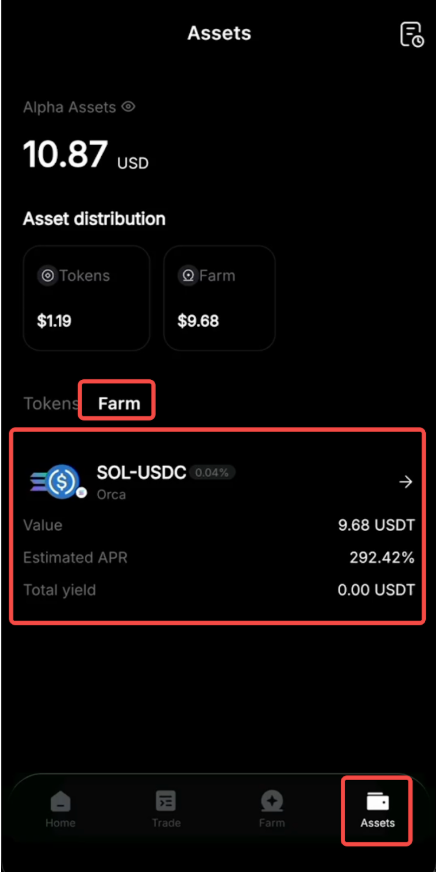
Шаг 1. Перейдите на вкладку Активы → Ферма, чтобы просмотреть активные ордера, а затем найдите инвестиционный ордер, к которому хотите добавить больше средств.
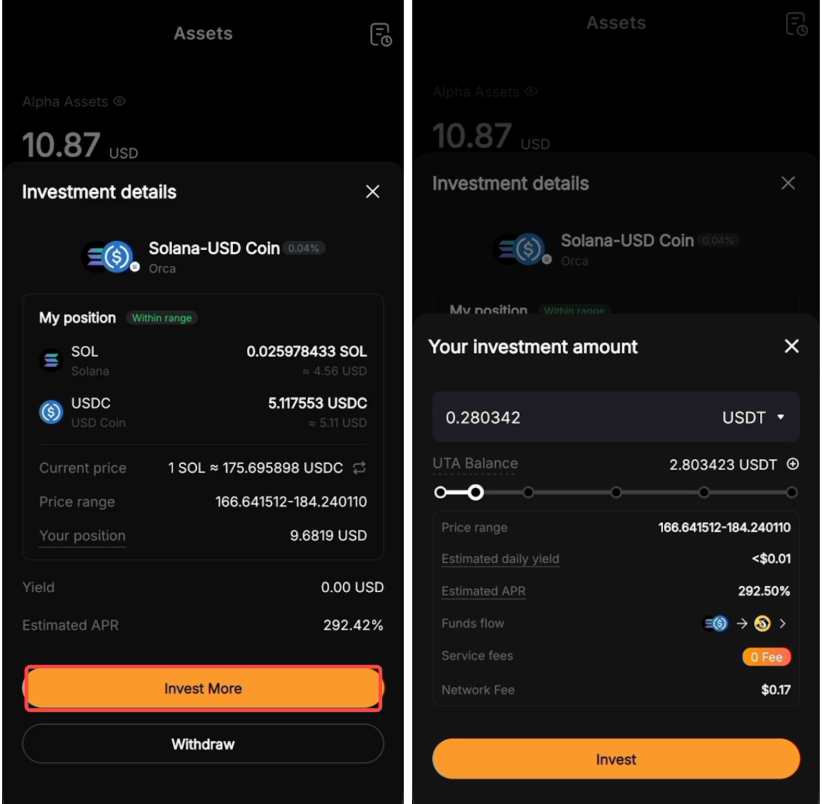
Шаг 2. Нажмите Инвестировать еще, чтобы добавить больше средств к существующей позиции в этом пуле ликвидности и потенциально увеличить награды. Введите желаемую сумму и нажмите Инвестировать, чтобы завершить процесс.
Как вывести ликвидность и получить награды
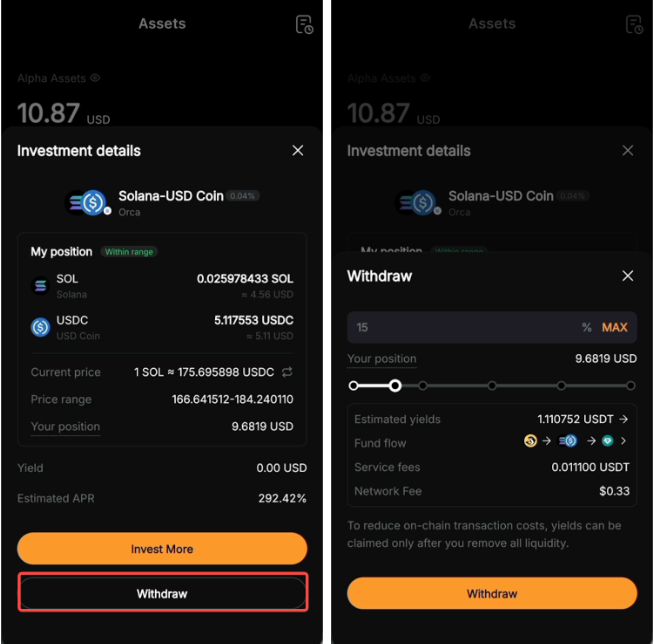
Шаг 1. Для отслеживания активных ордеров перейдите на вкладку Активы → Ферма.
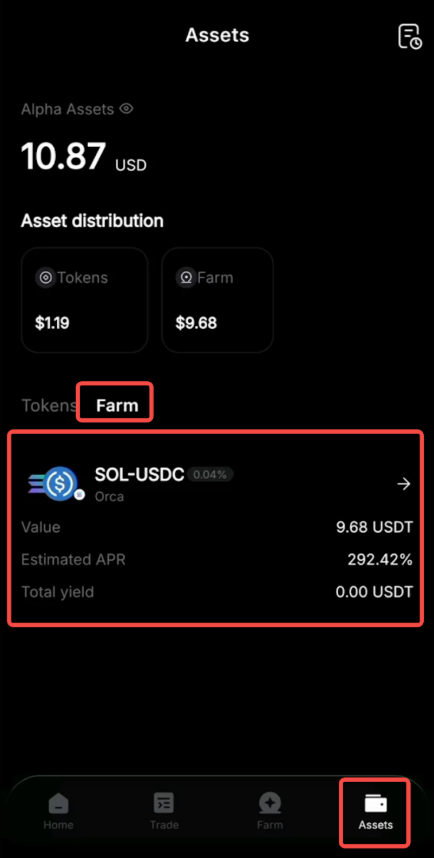
Шаг 2. Нажмите Вывести рядом с ордером, который хотите получить. Введите желаемую сумму получения.
Примечания:
— При выборе более 90% позиции вся ликвидность будет выведена.
— Основная сумма и доходность (за исключением применимых комиссий) будут возвращены на ЕТА.
— Для снижения расходов на транзакции в сети, доход можно получить только после удаления всей ликвидности.