How to Send an Email via Dmail Network
AI Summary
Show More
Quickly grasp the article's content and gauge market sentiment in just 30 seconds!
In this tutorial, we will be going through how you can send an email via Dmail Network.

Step 1: Navigate to the Dmail Network login page through the Airdrop campaign page. Click on Bybit Wallet and complete the login process by signing.
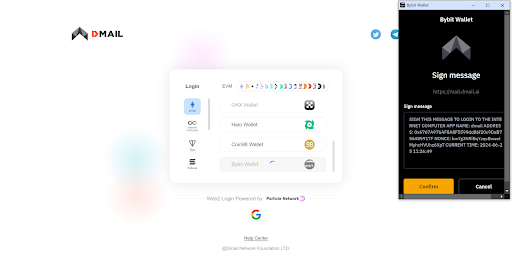
If you’re using your mobile device, simply head to the Bybit App, and visit the Dmail login page from the Bybit Web3 Airdrop Arcade campaign page. Use your Bybit Wallet, select the B² Network and complete the login process by signing.
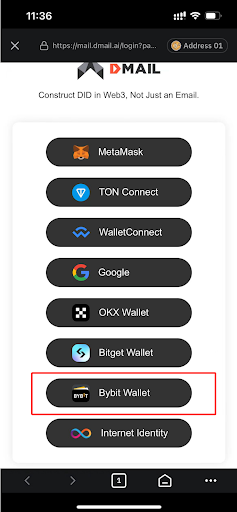
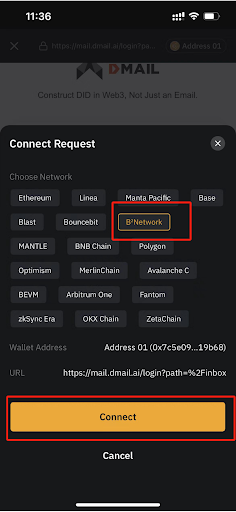
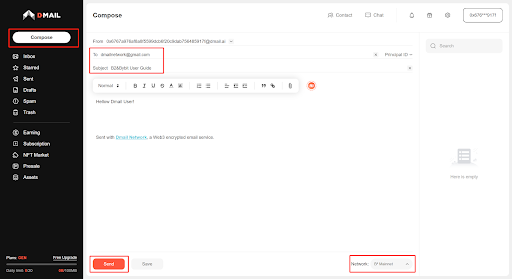
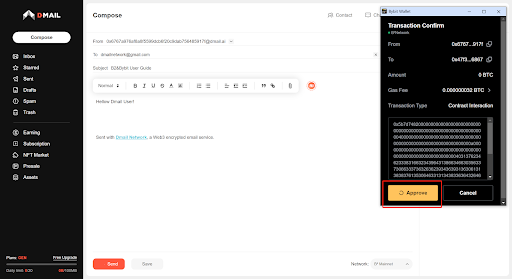
Step 2: After you’ve entered Dmail, click the Compose button in the top left corner. Then, enter the recipient’s address, subject, and email body. Ensure your current network is set to B² Mainnet before clicking the Send button.
Step 3: Confirm the transaction by clicking on Approve. Do note that you will need to make a gas fee payment. Once done, the email will be successfully sent.
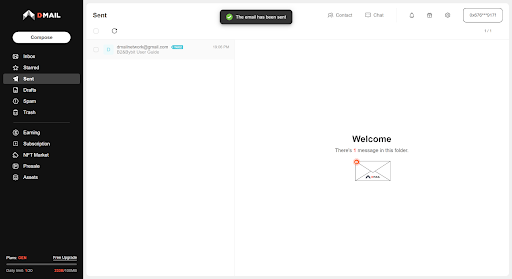
Step 4: Click on the Sent tab on the left hand side of the page to confirm that the email has been sent.
#LearnWithBybit
Grab Up to 100 USDT in Rewards
Also, enjoy 555% APR on Bybit Earn products!