FAQ — Value Added Tax (VAT)

logo
最終更新日:2026-01-19 12:03:07
シェア

What is Value Added Tax (VAT)?

Value Added Tax (VAT) is a consumption tax applied to the import and supply of goods and services at each stage of production and distribution, including deemed supplies. It is an indirect tax that is ultimately borne by the end consumer.


What does VAT mean to me as a Bybit user?

Under United Arab Emirates (UAE) tax regulations, a 5% VAT applies to trading and service fees charged by crypto exchanges incorporated in the UAE. Bybit is required to collect the applicable VAT on these fees and remit it directly to the UAE tax authorities.

Where applicable, users will be charged 5% VAT on all taxable supplies, in accordance with the laws and regulations prescribed by the Federal Tax Authority (FTA) of the UAE.


Who is subject to VAT?

VAT applies to UAE residents who create a Bybit account on or after Jan 19, 2026.


Why does VAT apply to new users who sign up on or after Jan 19, 2026, but not to existing users?

This is due to a change in the legal entity under which users sign up on Bybit Global. From Jan 19, 2026, all new users will be onboarded under an entity incorporated in the UAE and regulated by the Securities and Commodities Authority (SCA). As a result, these users are required to comply with applicable UAE tax regulations, including VAT, where relevant.


How can I update my Identity Verification information if my country or region of residence has changed?

Please refer to this guide for step-by-step instructions.


What products and services are subject to VAT?

A 5% VAT will be applied on top of the trading or service fees for the products and services listed below. VAT does not apply to interest charges or to services provided free of charge.

Please note that this is a general overview of cases where VAT may apply. As Bybit's product offerings may change over time, Bybit reserves the right to apply VAT in relevant situations that are not explicitly listed here.


Product/Service

Scenarios subject to VAT

Spot Trading

Spot Margin Trading

  1. Trading fees
  2. Liquidation fees


VAT is deducted directly from the assets received.


Example:

User A sells 1 BTC in the BTC/USDT pair at a price of 100,000 USDT, with a 0.1% trading fee.

  1. Trading fee = 100,000 × 0.1% = 100 USDT
  2. VAT = Trading fee × 5% = 5 USDT
  3. Amount received = 100,000 − 100 − 5 = 99,895 USDT

Unified Trading Account (UTA)

  1. Handling fees
  2. Manual repayment
  3. Auto repayment
  4. Liquidation fees

One-Click Buy

  1. Third-party service fees (if applicable)

Fiat Deposit/Withdrawal

  1. Deposit/withdrawal fees

Crypto Withdrawal

  1. Withdrawal fees
  2. On-chain withdrawal
  3. Withdrawal of incorrectly deposited coins
  4. Withdrawal of assets from abnormal origins


Note: VAT applies whenever Bybit charges a fee, including fees for recovering deposits with a missing or incorrect Tag/Memo.

Small Balance Conversion

  1. Conversion fees

Derivatives

  1. Futures
  2. Perpetual
  3. Expiry
  4. Options
  1. Trading fees
  2. Settlement fees
  3. Liquidation fees


Note: VAT does not apply to funding fees, as these are exchanged directly between long and short position holders rather than charged by Bybit.

Crypto Loans (New)

  1. Liquidation fees

On-Chain Earn

  1. Service fees for staking and redemption


VAT is deducted directly from interest earnings.

  1. Service fee = Interest × Service fee rate
  2. VAT = Service fee × 5%
  3. Amount received = Total interest − Service fee − VAT


Note: Service fee rates vary by protocol.

Margin Staked SOL

  1. Network fees


Note: VAT does not apply to interest accrued on borrowed SOL.

Trading Bot

  1. Trading fees

TradFi

  1. Trading fees (commission)

Alpha

  1. Trading fees
  2. Network fees


Where can I check the VAT details?

After the order is filled, you can find the details from:

  1. The Trade History section at the bottom of the trading page; or
  2. The Trade History tab on the Orders page.


Can I export my VAT invoice?

Yes, VAT invoices are generated monthly and become available for download starting on the 14th of the following month. You'll be able to access invoices from the past 8 years as time goes on. Please note that invoices must be downloaded one month at a time, as batch exporting is not supported.


How can I download my VAT tax invoice?

You can download your VAT tax invoice as a PDF from the Bybit website by following these steps:


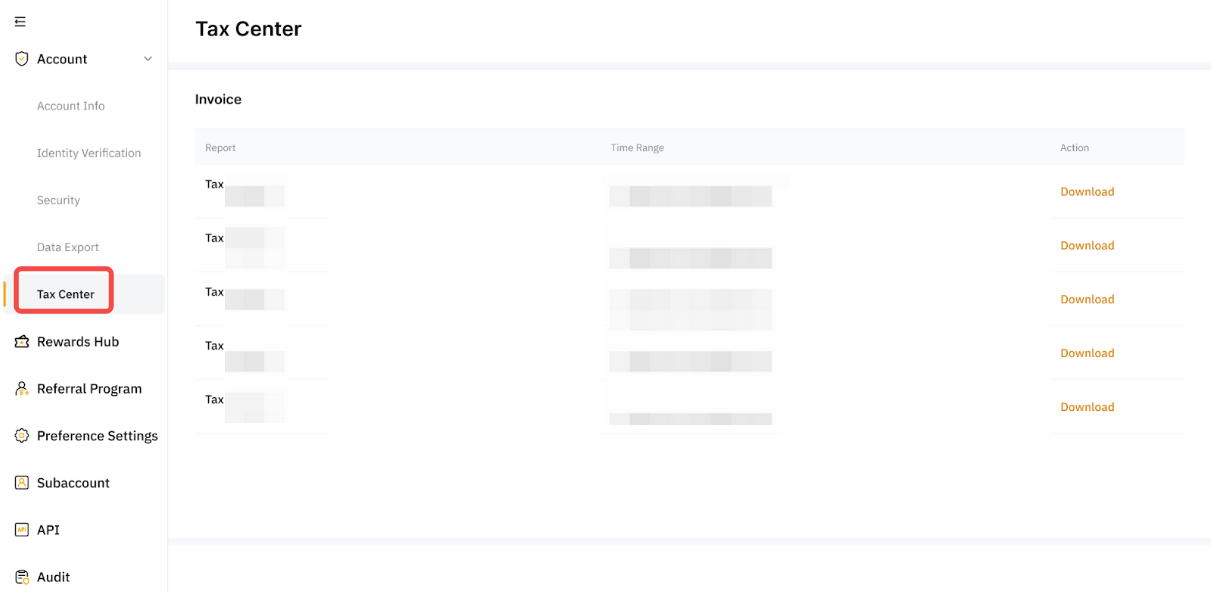
Step 1: Hover over your profile icon in the navigation bar, then go to AccountTax Center in the left panel.


Step 2: You'll see a list of monthly tax invoices. The invoice period is based on Coordinated Universal Time (UTC).


Step 3: Click Download to save your invoice as a PDF. In most cases, the file will download immediately.

役に立ちましたか?