
Copy Trading Pro on Bybit allows users (Investors) to invest in strategies created by experienced traders, known as Pro Masters. As a Pro Master, you can raise funds for your trading strategies and earn profit sharing from Investors' earnings. This guide will walk you through the application process on the App.
Important Notes:
Before you submit your Pro Master application, please note:
-
Difference between Copy Trading and Copy Trading Pro: These are distinct forms of Copy Trading. For more details, refer to Introduction to Copy Trading Pro.
-
Understanding Copy Trading Pro: Familiarize yourself with how it works by reading the Key Rules of Copy Trading Pro.
-
Application Eligibility: You can only apply to become a Pro Master using your Main Account. If you are unable to view the application entrance, you might not be eligible to apply. For more details, refer to FAQ — Copy Trading Pro.
Steps to Apply
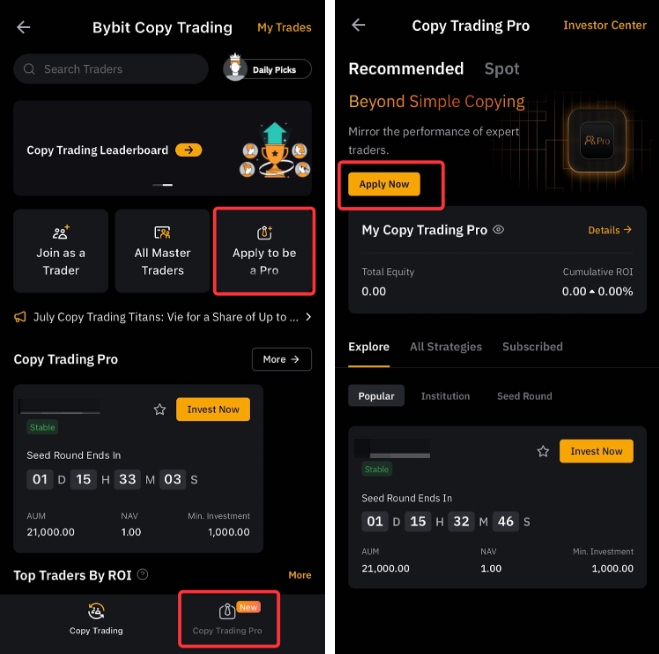
Step 1: Tap Copy Trading on the Bybit App homepage and tap on Apply to be a Pro. Alternatively, select Copy Trading Pro, and tap Apply Now.
Step 2: Follow the instructions and fill in the required information. Please note that your Pro Master nickname and bio cannot be changed after submitting the application.
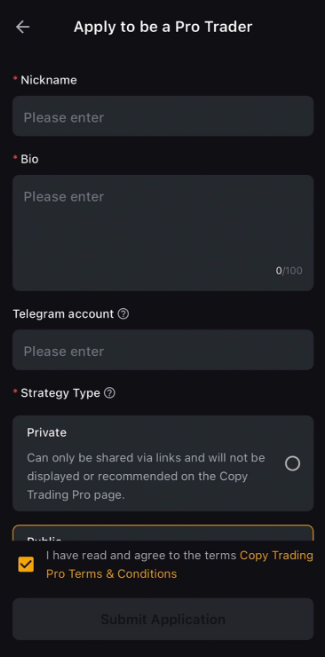
Information Required
|
Information Required |
Description |
|
Nickname |
|
|
Bio |
|
|
Telegram Account |
Your Telegram ID will only be used by Bybit to contact you, and will not be shared with other users. |
|
Strategy Style* |
Specify if your strategy is Private or Public.
|
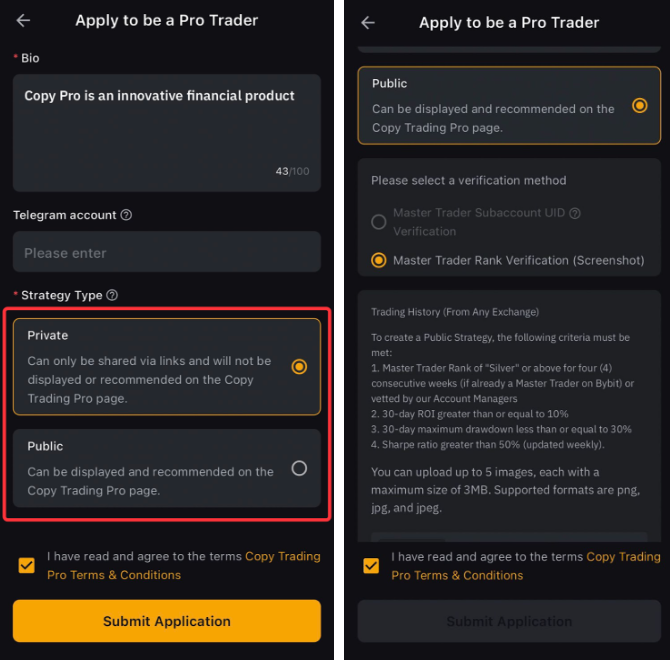
*Strategy Style Details
There are two (2) types of strategies:
-
Private Strategy:
-
Accessible only to your community.
-
Private Strategy can only be shared via links and not displayed or recommended on the Copy Trading Pro page.
-
No specific criteria for creating a Private Strategy.
-
-
Public Strategy:
-
Open to all users for investment.
-
Public Strategy will be displayed and recommended on the Copy Trading Pro page.
-
Criteria:
-
Master Trader Rank of "Bronze" or above for three (3) consecutive weeks (if already a Master Trader on Bybit).
-
30-day ROI ≥ 10%
-
30-day maximum drawdown ≤ 20%
-
30-day Sharpe ratio > 50% (updated weekly)
-
-
Verification:
-
Existing Master Traders: You can use the Master Trader Subaccount UID Verification method. The system will auto-review the Master Trader Subaccounts under your account.
-
Non-existing Master Traders: You must be recommended by a Bybit relationship manager. Submit screenshots of your last 30 days of trading history from any exchange to prove that you meet the criteria.
-
-
Step 3: The Bybit team will review your application within 3-7 working days.
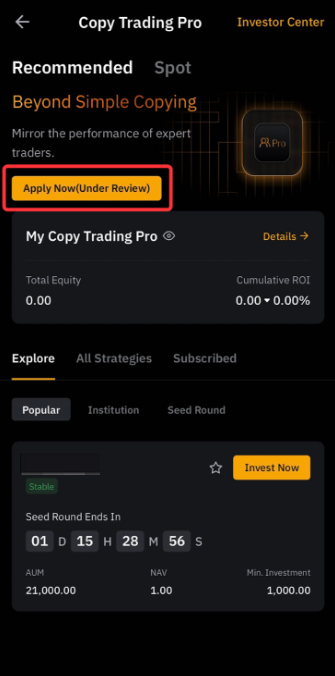
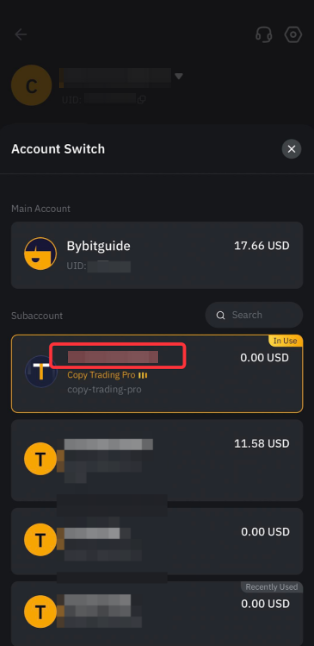
Step 4: Once approved, you can switch to your Copy Trading Pro subaccount (account name starts with CP) to create your strategy.
Steps to Create Your Strategy
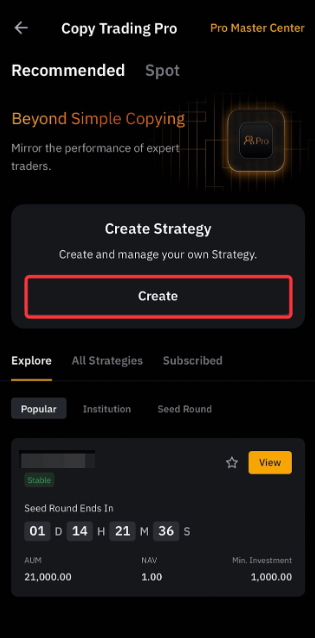
Step 1: On the Copy Trading Pro page. Tap Create.
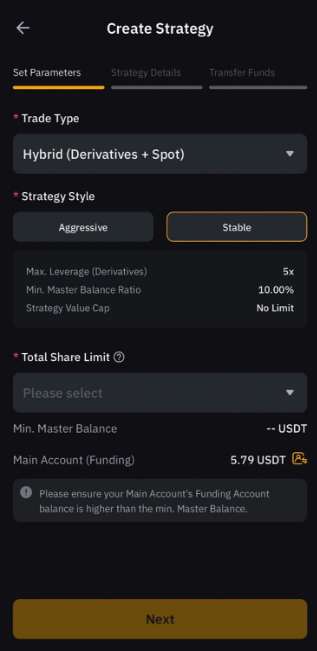
Step 2: Set your strategy parameters. Choose your trade type, and strategy style (Stable or Aggressive), input the Total Share Limit, and tap Next.
Parameters to set up
|
Parameters |
Description |
|
Trade Type |
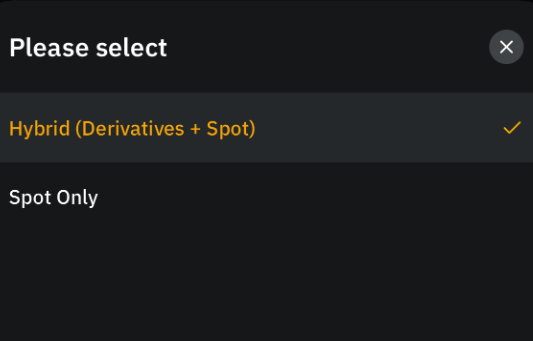
Spot Only or Hybrid (Derivatives + Spot)
Only Spot Trading, USDT Perpetual, and USDC Perpetual are supported in Copy Trading Pro.
|
|
Strategy Style |
Aggressive or Stable
Different strategy styles will have different allowable maximum leverage and different minimum master balances. |
|
Strategy Value Cap |
This refers to the highest total share limit you can select. For the Stable strategy style, the cap for strategy value is at five (5) million but may be increased shortly. |
|
Total Share Limit |
|
|
Minimum Master Balance |
|
|
Main Account (Funding) |
You need to prepare the minimum Master Balance on your Main Account’s Funding Account before it can be transferred into your strategy. If you have insufficient funds, click on the transfer icon and you will be directed to your Main Account to transfer funds. |
Step 3: Enter the Strategy Name, Description, Profit Sharing Percentage, Seed Round Date, and the Min. (optional) and Max. Investment Amount. Tap Next.
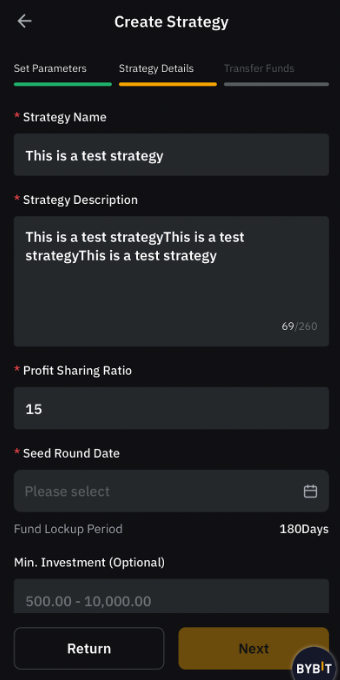
Strategy Details
|
Parameters |
Description |
|
Strategy Name |
|
|
Strategy Description |
|
|
Profit Sharing Ratio |
|
|
Seed Round Date |
|
|
Min. Investment & Max. Investment Amount |
This is the minimum and maximum investment amount for each of your Investors. |
Step 4: Enter the amount you wish to add to your strategy. The amount will be transferred from your Main Account’s Funding Account to your strategy. Tap Confirm.
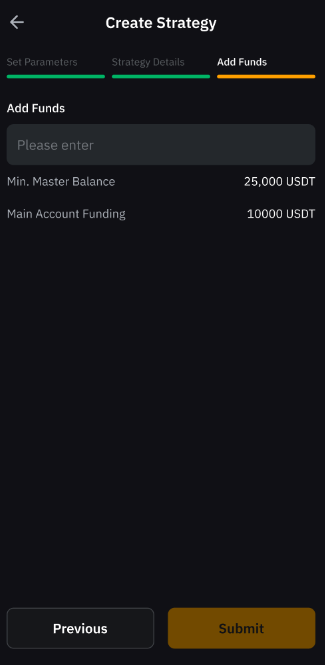
Step 5: The strategy is created successfully! Your strategy will be reviewed within 1-3 working days.
Once your strategy is approved, it starts the seed round phase according to the preset date. The seed round lasts three (3) days, after which, the funds (including your invested balance) will be transferred to your Copy Pro Master account’s Unified Trading Account by 2AM on the next day when the seed round ends.
You are now set for your Pro Master journey!