To make the most of your trading experience on Bybit, it is important to understand the different trade settings you can configure for your account before starting trading.
Please find below the various settings to consider to set up your orders.
In the Notifications Settings
On the Bybit app, you will be able to set up mobile push notifications to inform you of the market evolution so that you will never miss an opportunity to trade.
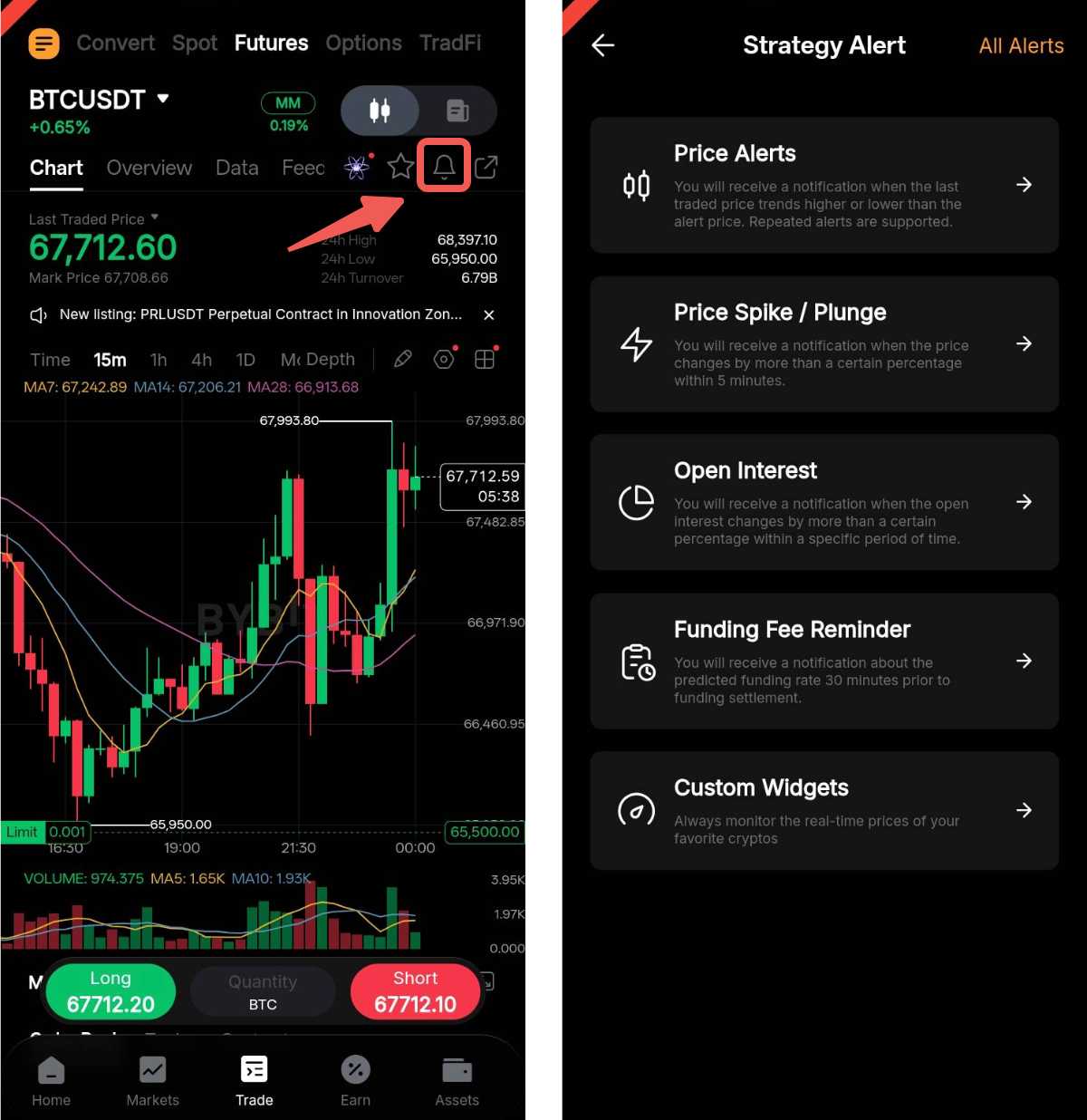
To create a Strategy Alert, please go to the chart page of the trading pair of your interest and tap on the Alerts icon in the top right corner of the page. You can set up different alerts based on your needs and check on your past and current alerts by tapping on All Alerts in the top right corner of the page.
Alerts | Explanation |
Price Alerts | Enable the Price Alerts setting to stay on top of your favorite crypto markets. It will notify you when the Last Traded Price trends higher or lower than your set price parameters. You can adjust the price parameters in two (2) following ways: - By Price, or
- By Price Change (%) of up to 25% in both directions.
You can set multiple price alerts with different parameters for the same trading pair. You will also have the option to adjust the frequency to Every 5 minutes, Alert Once Only, or Repeated Alerts. |
Price Spike / Plunge | The Price Spike / Plunge alert helps you monitor the price volatility of your selected USDT or Inverse perpetual trading pair. A notification will be sent when the contract price changes by more than a certain percentage within 5 minutes. The maximum preset value for the Price Spike / Plunge alert is 5% in both directions |
Open Interest | The Open Interest alert subscription will notify you whenever the number of outstanding contracts for your selected USDT or Inverse perpetual trading pair have changed by more than a certain percentage within a specific time period. The maximum preset value for the Open Interest alert is 5% in both directions. |
Funding Fee Reminder | With this setting enabled, you will receive a notification about the predicted funding rate 30 minutes before the funding settlement. You can set up a funding fee reminder for Inverse and USDT perpetual trading pairs. Please note that the funding fee reminder will remain active even if you are not holding any open position and must be disabled manually. |
Custom Widgets | A custom widget is a small, personalized “mini-window” that allows you to monitor the real-time prices of up to five (5) of your selected spot and futures trading pairs on your device. |
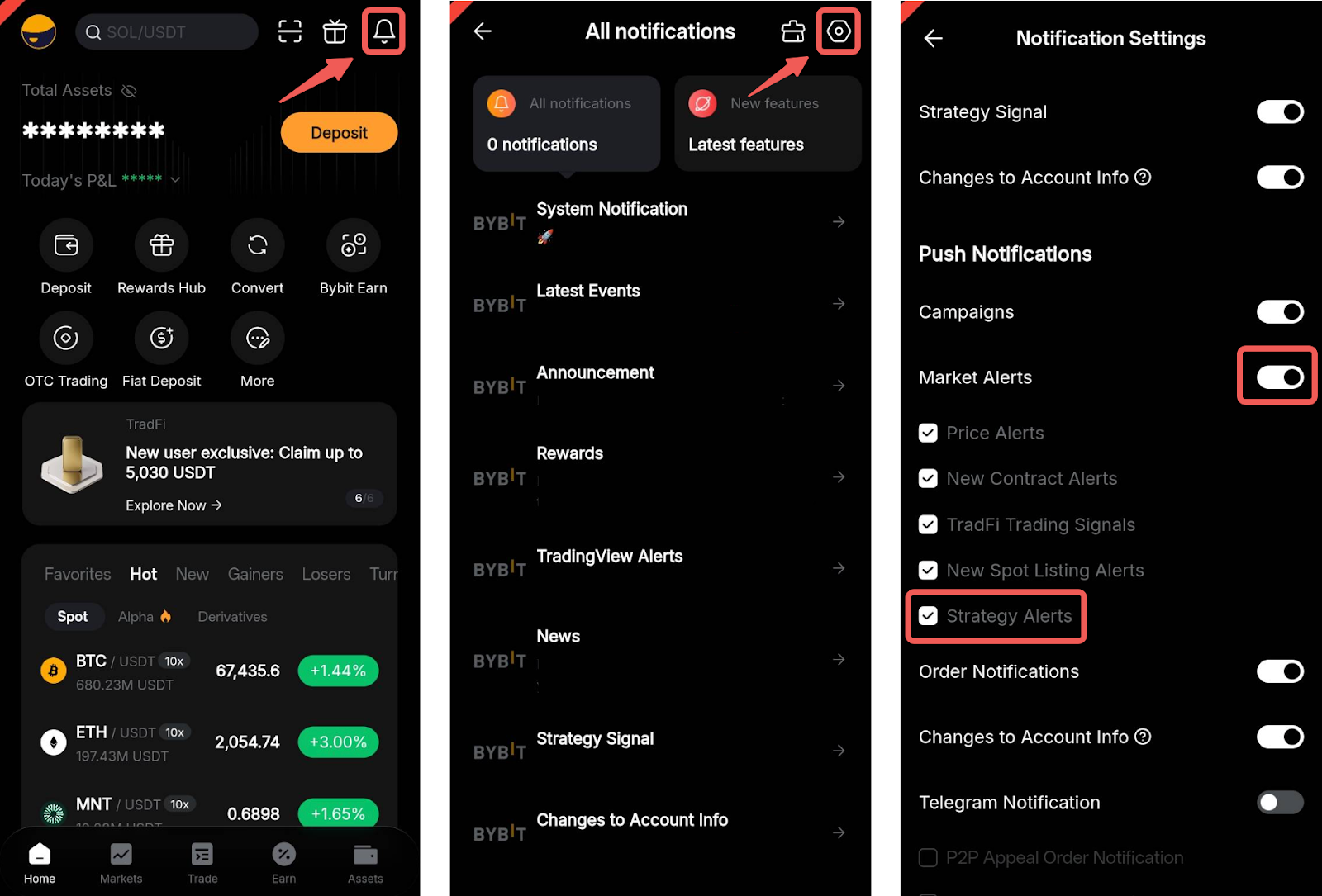
To receive the Strategy Alerts, ensure that your phone is allowing notifications from the Bybit App from your phone settings. Then, open your Bybit App and tap on the bell icon followed by the settings icon in the top right corner to display your notification settings.
In the Trading Page
Once on the Trade tab of each trading pair, you will be able to modify your trade settings by tapping on the three-dot icon in the top right corner. Then, select Trading Preferences and the trade settings menu will be displayed.
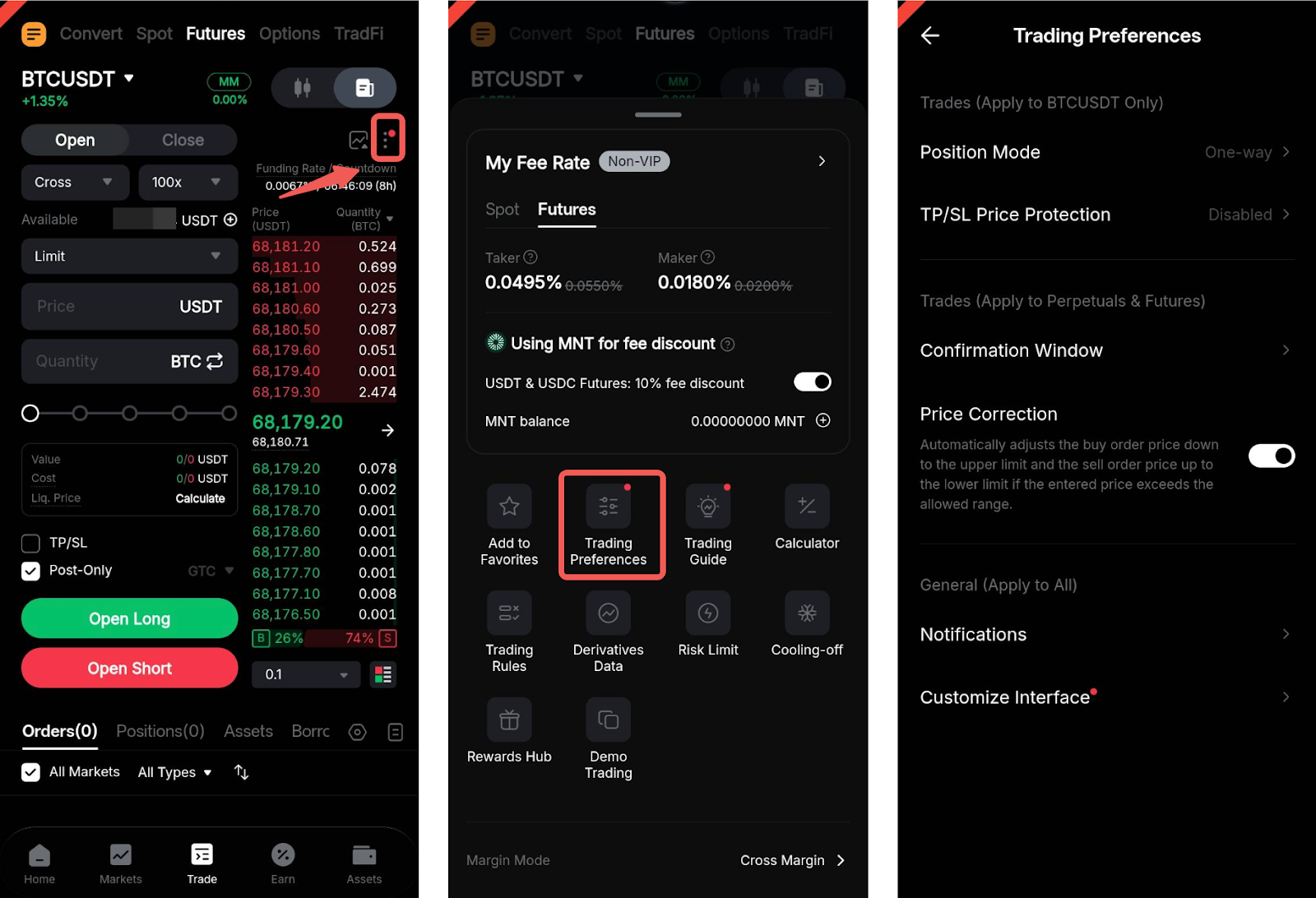
The trading preferences page allows you to set up key characteristics of your trades and personalize the information shown on your trading page.
Please find below the current settings available on the app:
Settings | Explanation |
Position Mode | Whenever applicable, you can choose between One-Way Mode and Hedge Mode for the trading pair that you are currently on. You can also apply this choice to all Perpetual and Expiry Trading Pairs. |
TP/SL Price Protection | Enabling this feature will help you control the execution of your TP/SL depending on the Last Traded Price and Mark Price evolutions. For more information, please consult this article. |
Confirmation Window | Enabling the different types of confirmation windows allows you to get a second confirmation before placing an order and to prevent you from order placement or modification mistakes. Bybit highly recommends having at least the Order Confirmation, Quick Reverse, Close All and Cancel All confirmation windows enabled to avoid any wrong actions. |
Price Correction | The Price Correction will automatically adjust the buy order price down to the upper limit and the sell order price up to the lower limit if the entered amount is less favorable than the current market price. A risk warning pop-up will appear to ask for your confirmation prior to order execution. The setting is applicable for both perpetual and expiry contracts. |
Notification | Enable the notification sounds from this page. You can also check on the type of notification you want to receive |
Customize Interface | To seamlessly switch and navigate between products, you can customize your trading interface by toggling the different functions available based on your preferences and strategies. |
