Копітрейдинг TradFi пропонує дві функції — «Запрошувальне посилання» та «Білий список підписників», — які дають змогу майстер-трейдерам керувати тим, хто може копіювати їхні угоди.
Створення запрошувального посилання
Увімкнення білого списку підписників
Додавання користувачів до білого списку
Коригування коефіцієнта розподілу прибутку
Видалення підписника
Створити посилання-запрошення
Як майстер-трейдер, ви можете згенерувати унікальне запрошувальне посилання, яке дасть змогу підписникам копіювати ваші угоди безпосередньо без додаткового підтвердження. Якщо білий список підписників увімкнено, підписники, які приєднаються за запрошувальним посиланням, будуть автоматично додані до білого списку.
Крок 1: Щоб створити посилання-запрошення, перейдіть у Центр користувача (Майстер-трейдер) → Мої підписники → Запрошення, а потім натисніть Створити посилання.

Крок 2: Натисніть Створити посилання і налаштуйте такі параметри:
- Термін дії: Виберіть 1 день, 3 дні, 7 днів або Ніколи чи встановіть конкретну дату й час завершення терміну дії. Коли термін дії посилання завершиться, запрошені користувачі більше не зможуть приєднатися за ним.
- Максимальна кількість запрошених: Укажіть число від 1 до 100. Запрошені копіювачі враховуватимуться в загальному ліміті копіювачів.

Примітка: Якщо вибрано Ніколи, посилання залишатиметься дійсним, доки не буде досягнуто максимальної кількості запрошених.
Крок 3: Натисніть Створити посилання ще раз. Усі створені посилання буде наведено в розділі Запрошення.
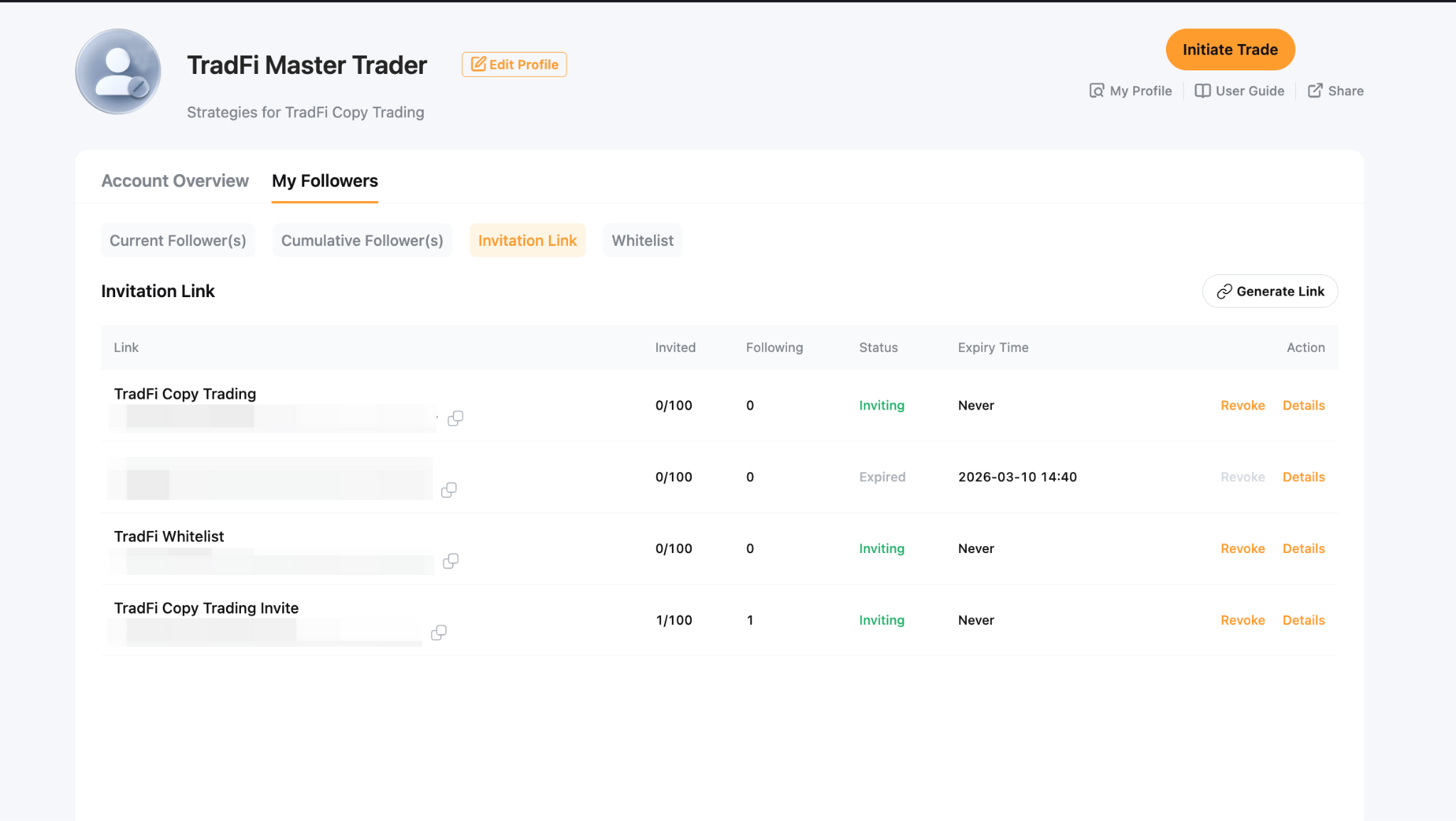
Крок 4: Поділіться посиланням зі своєю спільнотою або натисніть Деталі, щоб переглянути додаткову інформацію та доступні дії.

Увімкнути білий список підписників
Функція білого списку копіювачів дає вам повний контроль над тим, хто може копіювати ваші угоди. Ви можете додавати певних копіювачів групами та налаштовувати для них параметри розподілу прибутку й інвестицій.
Щоб увімкнути білий список підписників, перейдіть у Центр користувача (Майстер-трейдер) → Персональні налаштування → Налаштування підписників і ввімкніть опцію Білий список підписників.
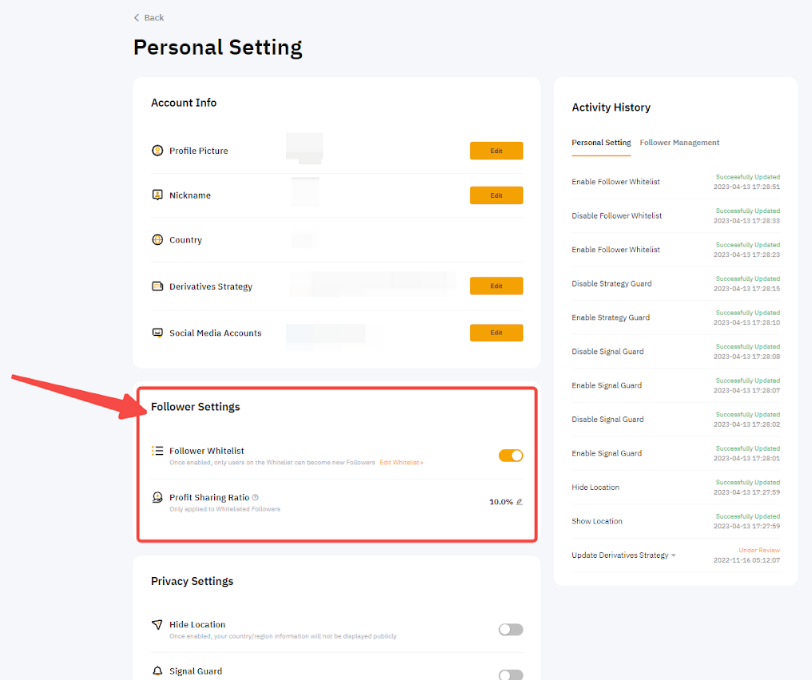
Після ввімкнення білого списку:
- Користувачі, яких немає у вашому білому списку, більше не зможуть стати вашими підписниками.
- Наявних підписників це не торкнеться, і вони зможуть копіювати ваші угоди, як і раніше.
- Ви можете встановити коефіцієнт розподілу прибутку в діапазоні від 0% до 50%. Будь-які зміни застосовуватимуться до всіх підписників.
- Ви можете встановити мінімальну суму інвестицій для підписників із білого списку в діапазоні від 100 до 1 000 000 USDT.
- Вас більше не буде включено в алгоритм рекомендацій копітрейдингу Bybit.
Додати користувачів у білий список
Користувачі з білого списку обираються майстер-трейдером вручну й отримують ексклюзивний дозвіл підписуватися на нього.
Крок 1. Щоб додати користувачів до білого списку, перейдіть у Центр користувача (майстер-трейдер) → Мої підписники → Білий список.

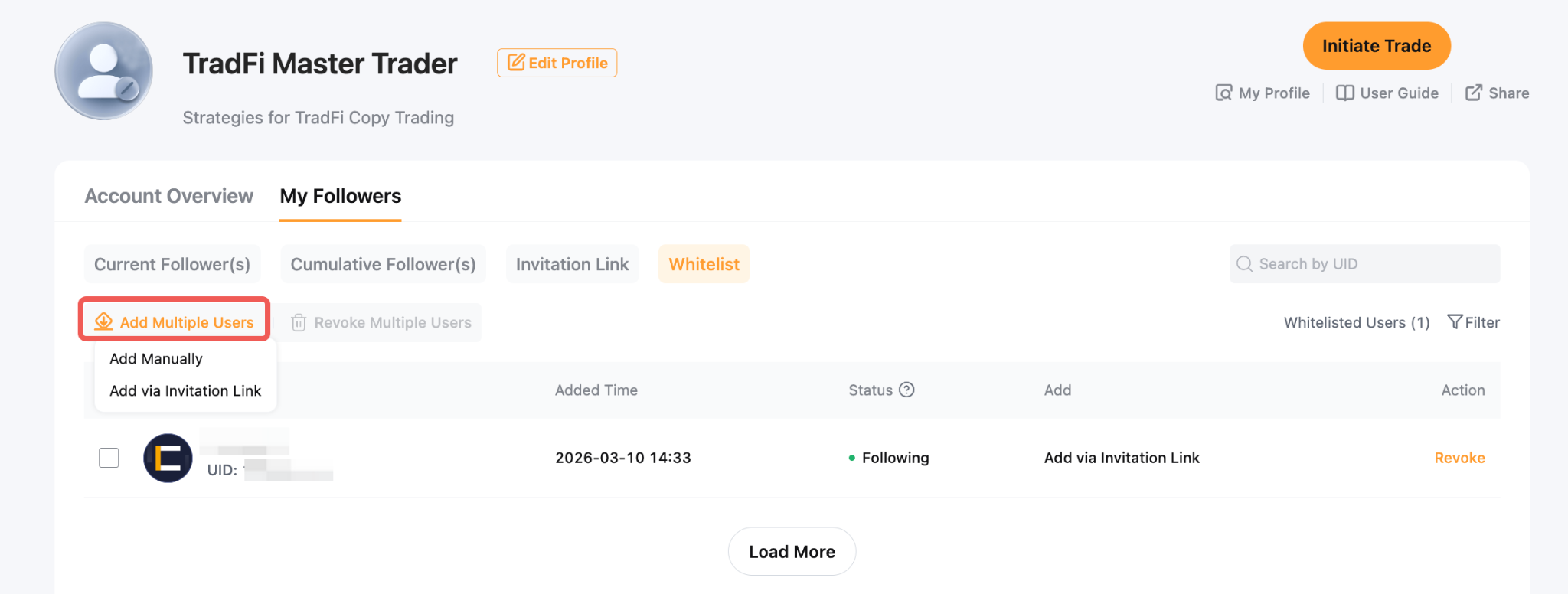
Крок 2: Натисніть Додати кількох користувачів і виберіть один із таких способів:
- Додати вручну: Введіть UID користувачів, яких ви хочете додати до білого списку, через кому.
- Додати за посиланням-запрошенням: Згенеруйте посилання-запрошення та поділіться ним. Щойно користувачі приєднаються за посиланням, їхні UID буде автоматично додано до вашого білого списку.
Примітки:
– Додавання UID основного акаунта до білого списку не означає автоматичного додавання UID його субакаунтів. Кожен UID субакаунта потрібно додавати окремо.
– Одночасно можна додати до 100 UID.
– Кожен майстер-трейдер може мати щонайбільше 300 підписників. Використання білого списку або запрошувальних посилань не збільшує цей ліміт.
– Для майстер-трейдерів, які беруть участь у Партнерській програмі Bybit, додавання користувачів до білого списку не реєструє їх за вашим партнерським посиланням і не генерує партнерських комісій.
Крок 3: Перевірте статус користувачів із білого списку в стовпці Статус і спосіб їх додавання в стовпці Спосіб додавання. Ви також можете скористатися значком фільтра у верхньому правому куті, щоб уточнити список.
- Очікує на підписку: Користувач наразі не копіює ваші угоди.
- Підписаний: Користувач активно копіює ваші угоди.

Налаштувати коефіцієнт розподілу прибутку
Майстер-трейдери можуть встановити коефіцієнт розподілу прибутку від 0% до 50%. Будь-які оновлення набудуть чинності о 3:00 UTC у другий понеділок і застосовуватимуться до всіх підписників.
Приклад
У таблиці нижче показано, як зміни коефіцієнта розподілу прибутку застосовуються з часом.
Щоб дізнатися більше про розподіл прибутку, див. статтю Копітрейдинг TradFi: Пояснення щодо розподілу прибутку.
Щоб налаштувати коефіцієнт розподілу прибутку, перейдіть у Центр користувача (майстер-трейдер) → Персональні налаштування → Налаштування підписників → Коефіцієнт розподілу прибутку.

Примітки:
– Функцію білого списку підписників не можна вимкнути протягом 24 годин після оновлення коефіцієнта розподілу прибутку.
– Коефіцієнт розподілу прибутку можна оновлювати лише раз на 24 години.
Видалення підписника
Після ввімкнення функції білого списку підписників ви можете видаляти підписників, чиї торгові стратегії або інвестиційні цілі більше не збігаються з вашими. Це дає змогу краще керувати базою підписників і гарантувати, що ваші стратегії будуть доступні для відповідної аудиторії.
Крок 1: Щоб видалити підписника з білого списку, перейдіть у Центр користувача (Майстер-трейдер) і натисніть Мої підписники → Білий список → Скасувати.
Ви також можете вибрати Скасувати для кількох користувачів, щоб видалити до 8 підписників одночасно.

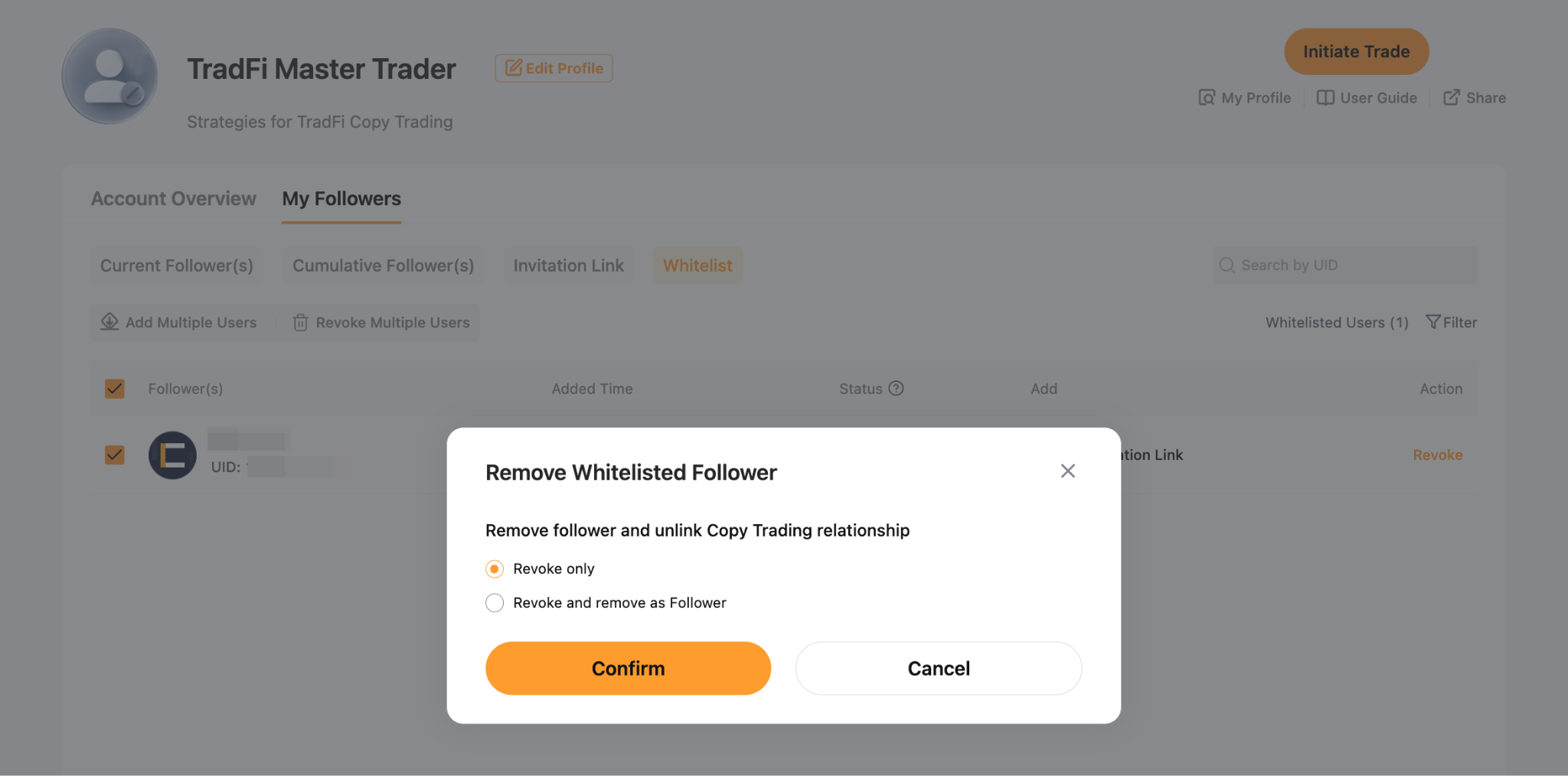
Крок 2: У вікні Скасувати статус у білому списку виберіть один із наведених нижче варіантів:
- Скасувати й видалити як підписника: Видаляє користувача з вашого білого списку та списку підписників. Усі відкриті позиції буде закрито, і він більше не зможе копіювати ваші угоди.
- Лише скасувати: Видаляє користувача з вашого білого списку, дозволяючи йому продовжувати копіювати наявні угоди, доки він не відпишеться. Щойно він відпишеться, він більше не зможе підписатися на вас, якщо його не буде повторно додано до білого списку.
Натисніть Підтвердити, щоб продовжити.